Backend Private Connectivity (VPC Endpoints)
🎯 Task 6 Objective: Deploy VPC Endpoints để optimize costs và security cho ECS Fargate
Tổng quan
Triển khai VPC Endpoints giúp các private subnets truy cập AWS services (S3, DynamoDB, ECR, CloudWatch Logs) mà không cần NAT Gateway. Lợi ích:
- Tiết kiệm chi phí: Giảm 30-50% traffic NAT Gateway (~$25-40/tháng tiết kiệm)
- Bảo mật: Traffic không rời khỏi AWS backbone network
- Hiệu năng: Độ trễ thấp hơn cho các cuộc gọi AWS service
- Tính khả dụng: Không phụ thuộc vào NAT Gateway cho AWS services
Tập trung tối ưu hóa chi phí:
- Gateway Endpoints (S3): MIỄN PHÍ
- Interface Endpoints (ECR, Logs): ~$14/tháng mỗi endpoint
- Dự kiến tiết kiệm NAT Gateway: 30-50% (~$25-40/tháng)
- Lợi nhuận ròng: ~$10-25/tháng với bảo mật tốt hơn
Điều kiện tiên quyết
Tài nguyên bắt buộc từ các Task trước:
- Task 4: VPC với private/public subnets
- Task 5: NAT Gateway hoạt động
- ECS Fargate cluster (để testing)
Xác minh điều kiện tiên quyết:
AWS Console:
- VPC Console → Xác minh VPC và subnets tồn tại
- VPC Console → Route Tables → Kiểm tra private route tables có NAT Gateway routes
- EC2 Console → NAT Gateways → Xác minh State = “Available”
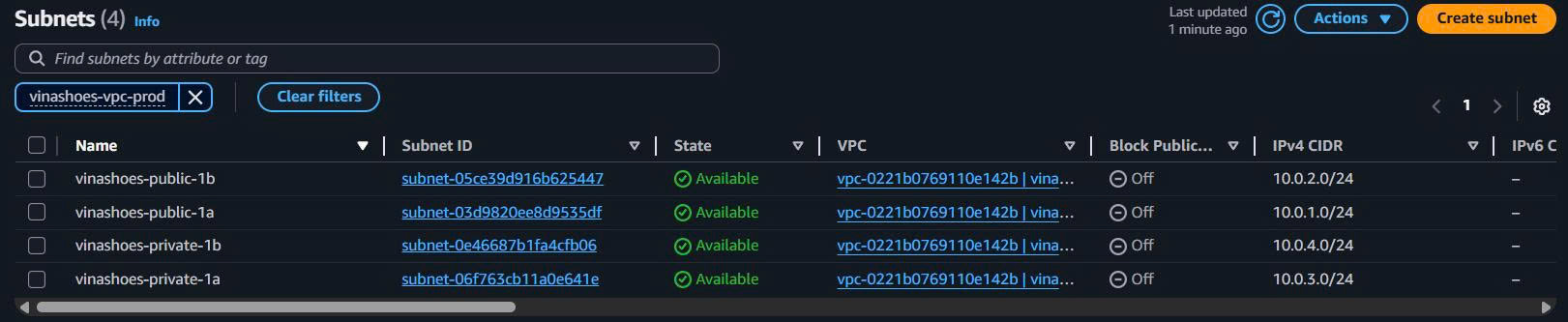

Task 6.1: S3 Gateway Endpoint (MIỄN PHÍ)
🎯 Mục tiêu: Tạo S3 Gateway Endpoint để route S3 traffic trực tiếp, bỏ qua NAT Gateway
6.1.1. Tạo S3 Gateway Endpoint
AWS Console:
-
Điều hướng đến VPC Endpoints:
- AWS Console → VPC → Endpoints
- Click “Create endpoint”
-
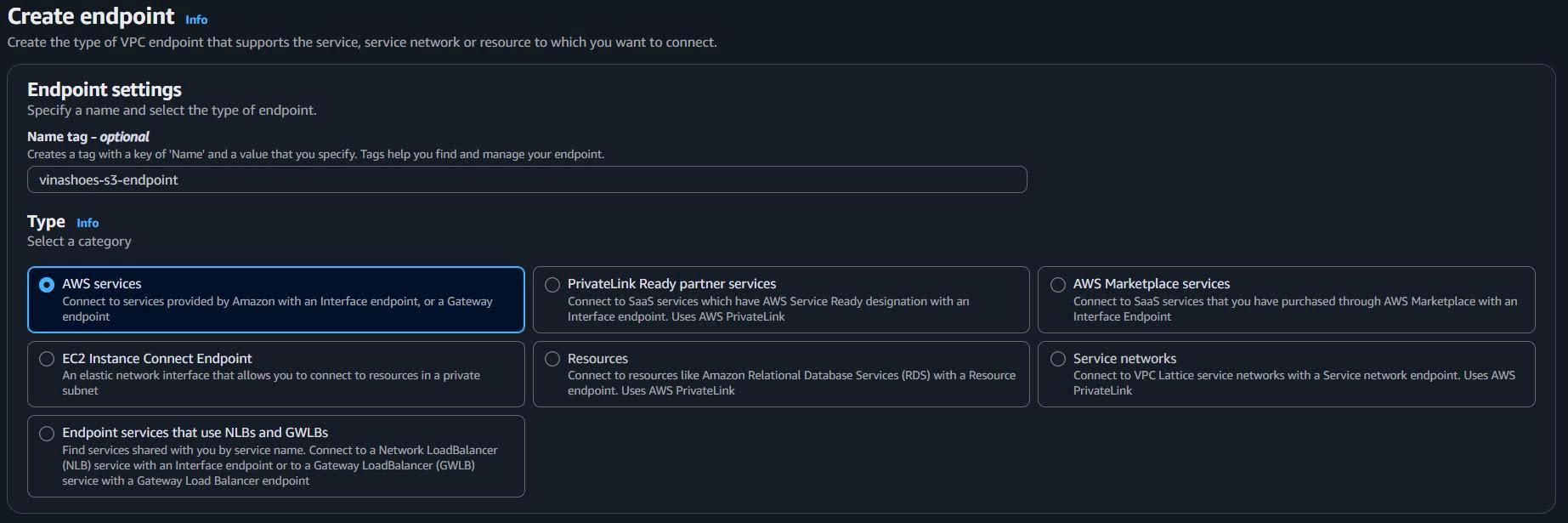
Cấu hình S3 Gateway Endpoint:
- Name tag: vinashoes-s3-endpoint
- Service category: AWS services
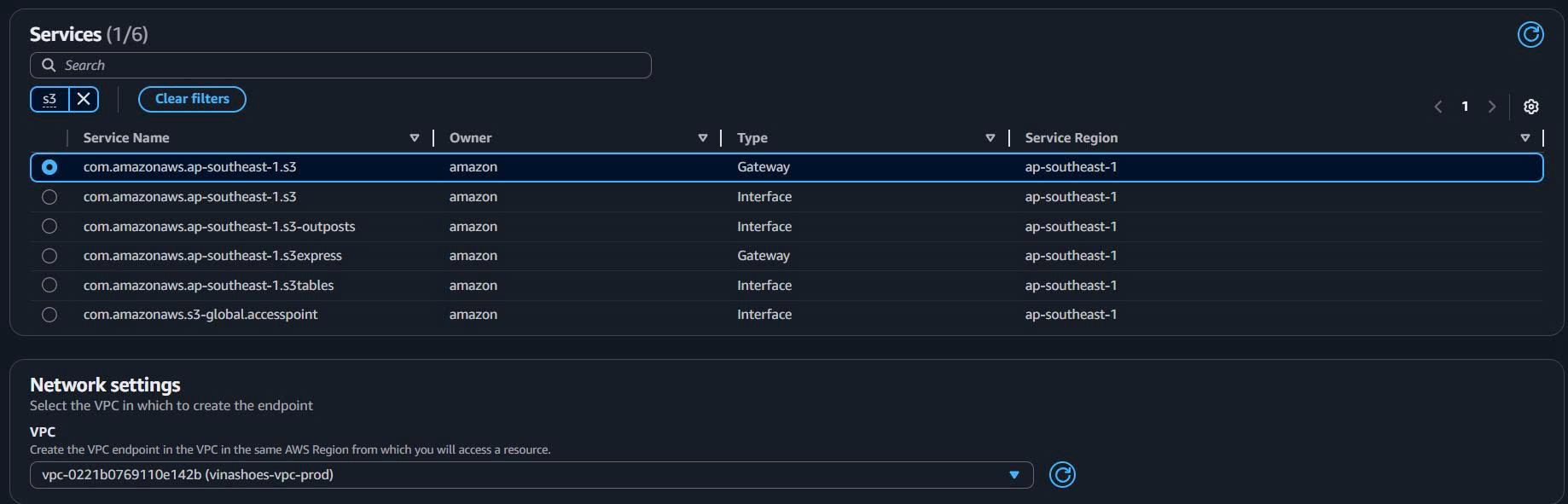
- Service name: Tìm kiếm và chọn
com.amazonaws.us-east-1.s3 - Type: Gateway (tự động chọn)
- VPC: Chọn VPC của bạn (vinashoes-vpc)
-
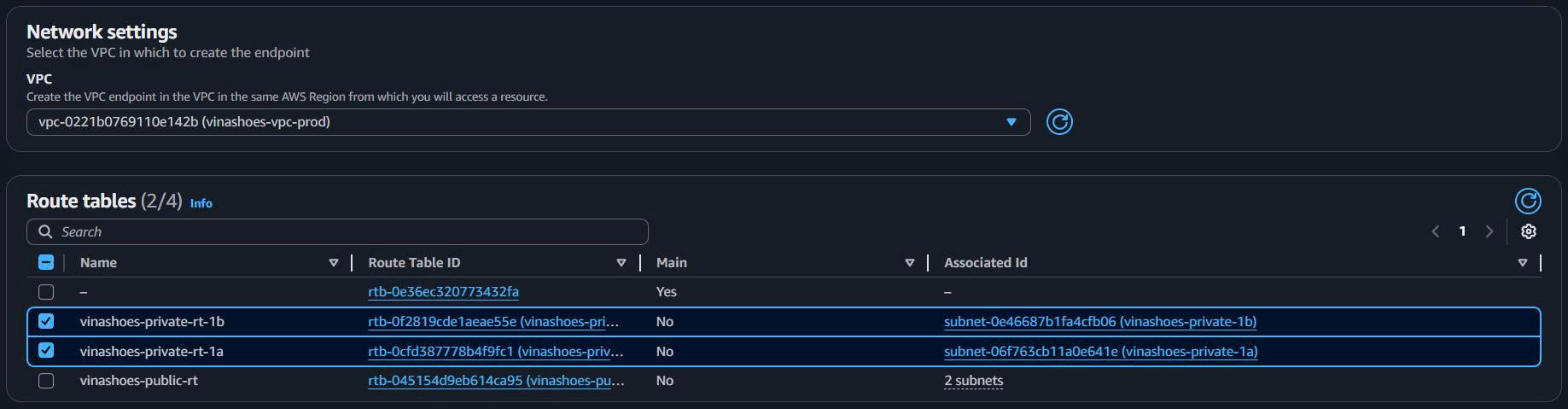
Cấu hình Route Tables:
- Route tables: Chọn cả hai private route tables:
- vinashoes-private-rt-1a
- vinashoes-private-rt-1b
- Policy: Full access (mặc định)
- Route tables: Chọn cả hai private route tables:
-
Thêm Tags và Tạo:
- Tags: Environment=Production, Project=VinaShoes
- Click “Create endpoint”


6.1.2. Xác minh S3 Gateway Endpoint
Kiểm tra Route Tables được cập nhật:
AWS Console:
- VPC Console → Route Tables
- Chọn Private Route Table AZ-1a:
- Kiểm tra route mới:
pl-63a5400a (S3)→vpce-xxxxxxxxx
- Kiểm tra route mới:
- Xác minh trong Private Route Table AZ-1b:
- Cùng S3 prefix list route nên xuất hiện


Route Table mong đợi:
Destination      Target                    Status
10.0.0.0/16      local                     active
0.0.0.0/0        nat-0def456ghi789012b     active
pl-63a5400a      vpce-1234567890abcdef0    active  ← Route S3 mới
CLI (nếu cần):
# Tạo S3 Gateway Endpoint
aws ec2 create-vpc-endpoint \
  --vpc-id $VPC_ID \
  --service-name com.amazonaws.us-east-1.s3 \
  --route-table-ids $PRIVATE_RT_1A $PRIVATE_RT_1B \
  --tag-specifications 'ResourceType=vpc-endpoint,Tags=[{Key=Name,Value=vinashoes-s3-endpoint}]'

# Xác minh endpoint
aws ec2 describe-vpc-endpoints --filters "Name=service-name,Values=com.amazonaws.us-east-1.s3"
✅ Danh sách kiểm tra S3 Gateway Endpoint:
- Endpoint State = “Available”
- Route tables được cập nhật với S3 prefix list
- Không có chi phí thêm (Gateway endpoints là MIỄN PHÍ)
- S3 traffic sẽ bỏ qua NAT Gateway
Task 6.2: ECR Interface Endpoint
🎯 Mục tiêu: Tạo ECR Interface Endpoints cho ECS Fargate container pulls, loại bỏ sự phụ thuộc vào NAT Gateway
6.2.1. Tạo Security Group cho Interface Endpoints
AWS Console:
-
Điều hướng đến Security Groups:
- AWS Console → EC2 → Security Groups
- Click “Create security group”
-
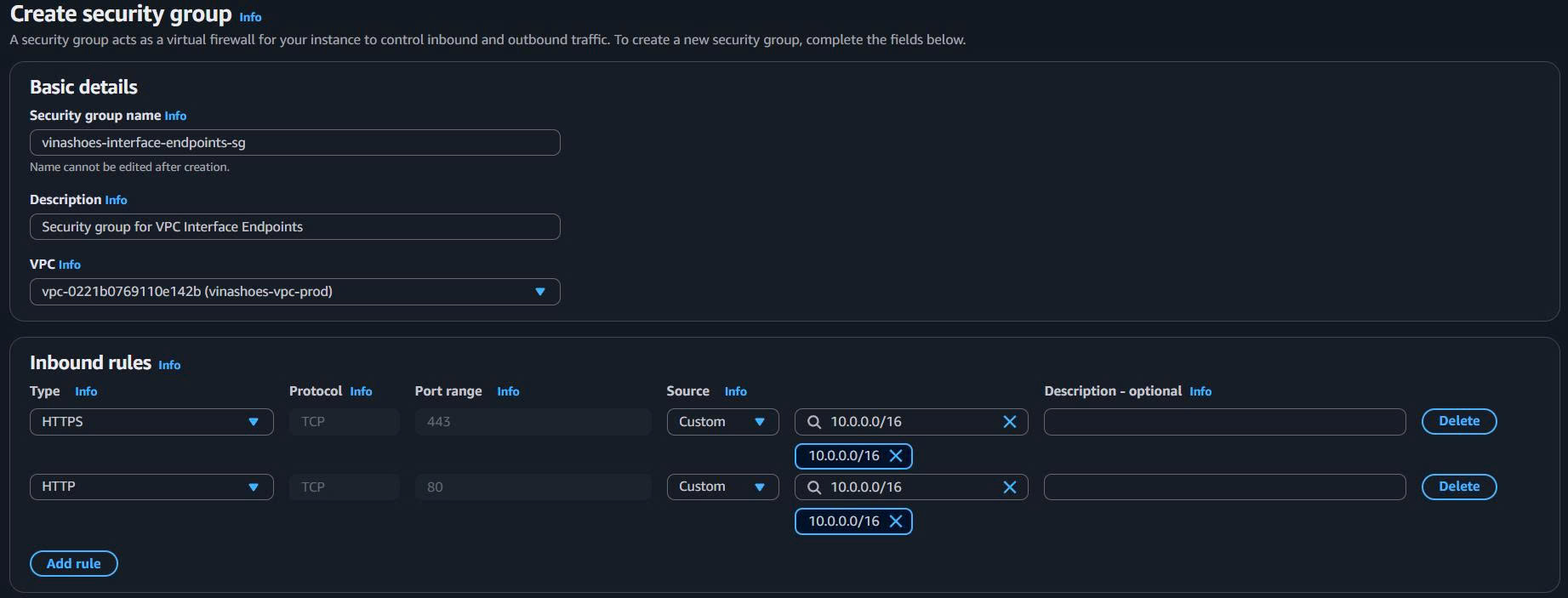
Cấu hình Security Group:
- Name: vinashoes-interface-endpoints-sg
- Description: Security group for VPC Interface Endpoints
- VPC: Chọn vinashoes-vpc
-
Cấu hình Inbound Rules:
- Rule 1: HTTPS (443) từ VPC CIDR (10.0.0.0/16)
- Rule 2: HTTP (80) từ VPC CIDR (10.0.0.0/16) - nếu cần
6.2.2. Tạo ECR API Interface Endpoint
AWS Console:
-
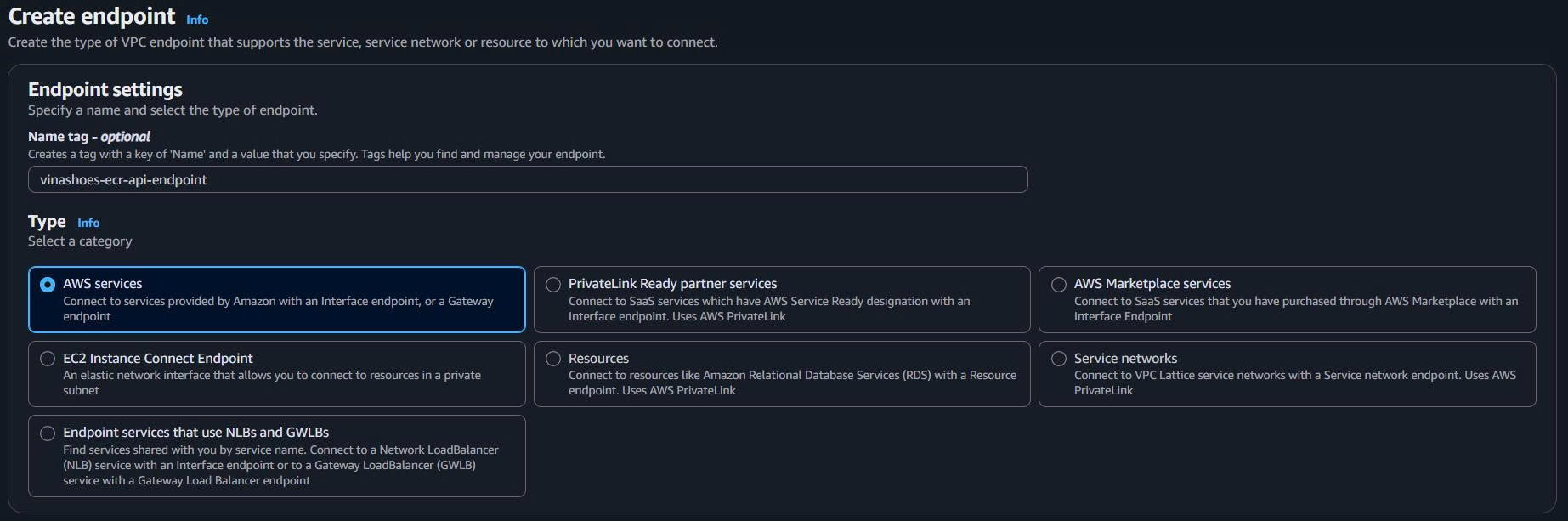
Tạo ECR API Endpoint:
- VPC Console → Endpoints → “Create endpoint”
- Name tag: vinashoes-ecr-api-endpoint
- Service name:
com.amazonaws.us-east-1.ecr.api - Type: Interface (tự động)
- VPC: vinashoes-vpc
-
Cấu hình Subnets:
- Subnets: Chọn cả hai private subnets:
- vinashoes-private-subnet-1a
- vinashoes-private-subnet-1b
- Security groups: vinashoes-interface-endpoints-sg
- Subnets: Chọn cả hai private subnets:
-
DNS Options:
- Enable DNS name: ✅ Đã check
- Policy: Full access
6.2.3. Tạo ECR DKR Interface Endpoint
AWS Console:
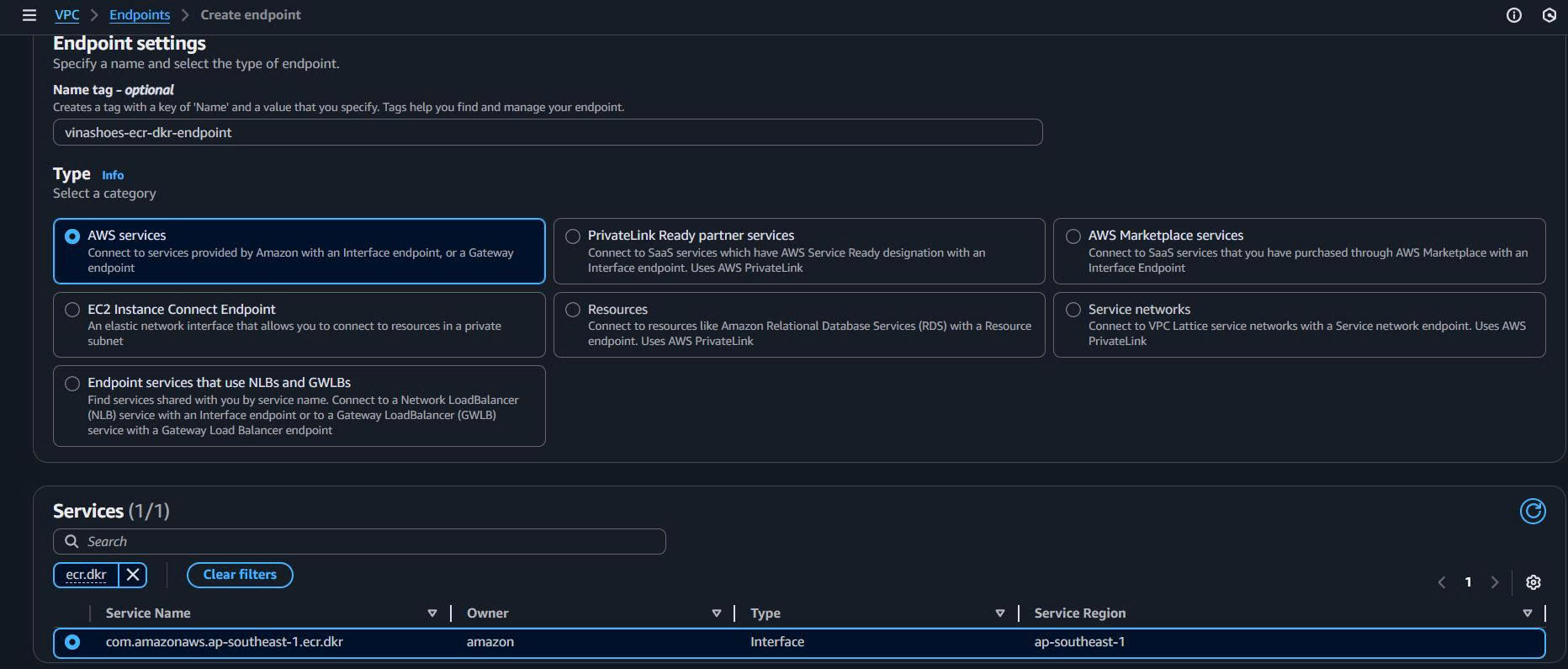
- Tạo ECR DKR Endpoint:
- Name tag: vinashoes-ecr-dkr-endpoint
- Service name:
com.amazonaws.us-east-1.ecr.dkr - Type: Interface
- VPC: vinashoes-vpc
- Subnets: Cùng private subnets
- Security groups: vinashoes-interface-endpoints-sg
- Enable DNS name: ✅ Đã check
6.2.4. Xác minh ECR Endpoints
Kiểm tra trạng thái Endpoint:
AWS Console:
- VPC Console → Endpoints
- Xác minh cả hai endpoints:
- vinashoes-ecr-api-endpoint: State = “Available”
- vinashoes-ecr-dkr-endpoint: State = “Available”

CLI (nếu cần):
# Tạo security group cho interface endpoints
aws ec2 create-security-group \
  --group-name vinashoes-interface-endpoints-sg \
  --description "Security group for VPC Interface Endpoints" \
  --vpc-id $VPC_ID

# Thêm inbound rule cho HTTPS
aws ec2 authorize-security-group-ingress \
  --group-id $INTERFACE_SG_ID \
  --protocol tcp \
  --port 443 \
  --cidr 10.0.0.0/16

# Tạo ECR API endpoint
aws ec2 create-vpc-endpoint \
  --vpc-id $VPC_ID \
  --service-name com.amazonaws.us-east-1.ecr.api \
  --vpc-endpoint-type Interface \
  --subnet-ids $PRIVATE_SUBNET_1A $PRIVATE_SUBNET_1B \
  --security-group-ids $INTERFACE_SG_ID \
  --private-dns-enabled

# Tạo ECR DKR endpoint
aws ec2 create-vpc-endpoint \
  --vpc-id $VPC_ID \
  --service-name com.amazonaws.us-east-1.ecr.dkr \
  --vpc-endpoint-type Interface \
  --subnet-ids $PRIVATE_SUBNET_1A $PRIVATE_SUBNET_1B \
  --security-group-ids $INTERFACE_SG_ID \
  --private-dns-enabled
✅ Danh sách kiểm tra ECR Endpoints:
- ECR API endpoint State = “Available”
- ECR DKR endpoint State = “Available”
- Security group cho phép HTTPS từ VPC CIDR
- DNS resolution được kích hoạt cho automatic routing
- Chi phí:
$14/tháng mỗi endpoint ($28/tháng tổng cộng)
Task 6.3: CloudWatch Logs Interface Endpoint
🎯 Mục tiêu: Tạo CloudWatch Logs Interface Endpoint cho ECS logging, giảm traffic NAT Gateway
6.3.1. Tạo CloudWatch Logs Interface Endpoint
AWS Console:
-
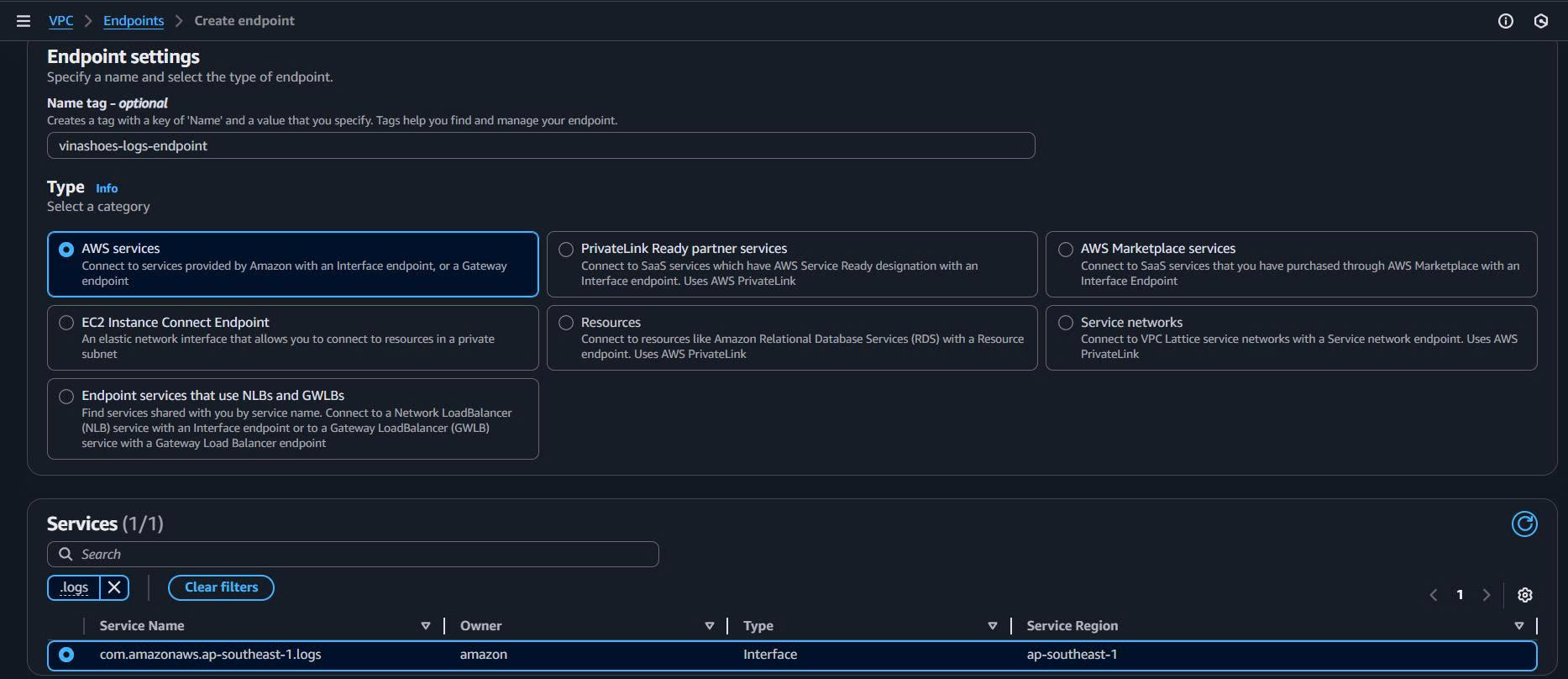
Tạo Logs Endpoint:
- VPC Console → Endpoints → “Create endpoint”
- Name tag: vinashoes-logs-endpoint
- Service name:
com.amazonaws.us-east-1.logs - Type: Interface
- VPC: vinashoes-vpc
-
Cấu hình Endpoint:
- Subnets: Chọn cả hai private subnets
- Security groups: vinashoes-interface-endpoints-sg (tái sử dụng từ ECR)
- Enable DNS name: ✅ Đã check
- Policy: Full access
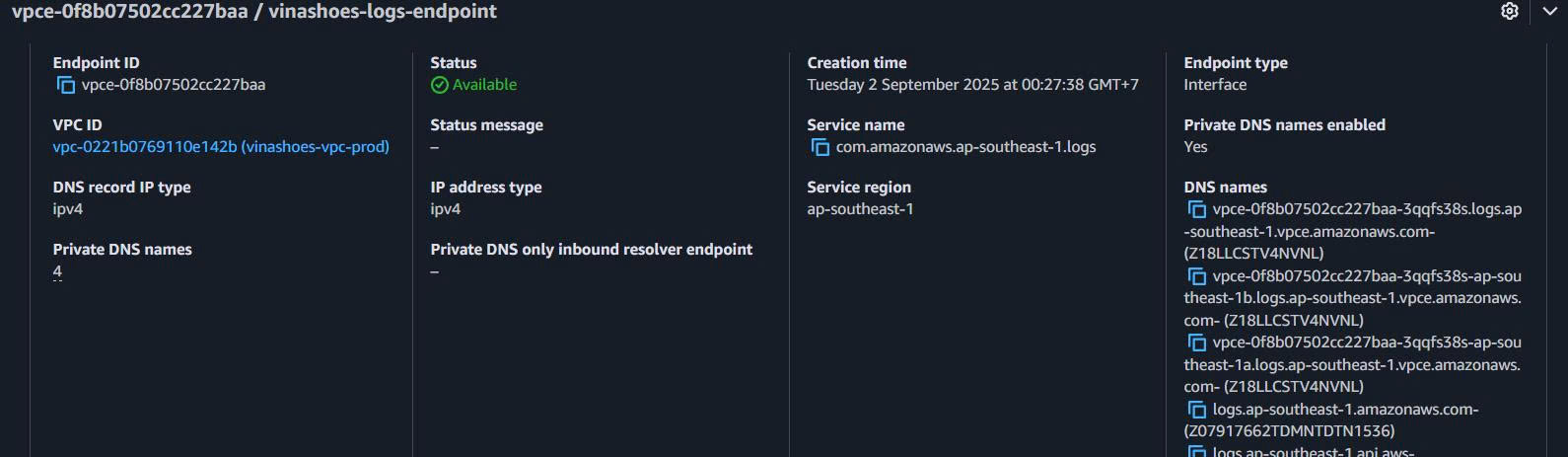
6.3.2. Xác minh Logs Endpoint
Kiểm tra trạng thái Endpoint:
AWS Console:
- VPC Console → Endpoints
- Xác minh logs endpoint: State = “Available”
- Kiểm tra DNS Names: Ghi chú endpoint DNS names để xác minh
CLI (nếu cần):
# Tạo CloudWatch Logs endpoint
aws ec2 create-vpc-endpoint \
  --vpc-id $VPC_ID \
  --service-name com.amazonaws.us-east-1.logs \
  --vpc-endpoint-type Interface \
  --subnet-ids $PRIVATE_SUBNET_1A $PRIVATE_SUBNET_1B \
  --security-group-ids $INTERFACE_SG_ID \
  --private-dns-enabled
Task 6.4: Testing & Verification
🎯 Mục tiêu: Xác minh tất cả VPC endpoints hoạt động đúng và traffic bỏ qua NAT Gateway
6.4.1. Test S3 Gateway Endpoint
Phương pháp 1: ECS Task Testing
AWS Console:
-
Kết nối đến ECS Task:
- ECS Console → Clusters → Chọn cluster của bạn
- Tasks tab → Chọn running task
- Configuration tab → Connect (Session Manager)
-
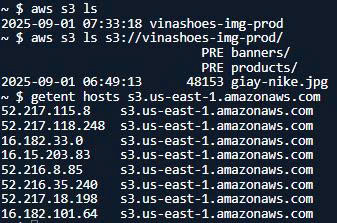
Test S3 Access:
# Test S3 connectivity
aws s3 ls

# Test specific bucket (nếu có)
aws s3 ls s3://your-bucket-name/

# Check resolved IP (should be private AWS IP, not public)
getent hosts s3.us-east-1.amazonaws.com
6.4.2. Test ECR Endpoints
Test Container Pull:
AWS Console:
- Trong ECS Task Terminal:
# Test ECR authentication
aws ecr get-login-password --region us-east-1

# Test ECR API access
aws ecr describe-repositories

# Check ECR endpoint resolution
getent hosts api.ecr.us-east-1.amazonaws.com
getent hosts dkr.ecr.us-east-1.amazonaws.com
6.4.3. Test CloudWatch Logs Endpoint
Test Logging:
AWS Console:
- Trong ECS Task Terminal:
# Test CloudWatch Logs access
aws logs describe-log-groups

# Test log stream creation (nếu permissions cho phép)
aws logs create-log-stream --log-group-name /ecs/vinashoes --log-stream-name test-stream

# Check logs endpoint resolution
getent hosts logs.us-east-1.amazonaws.com
6.4.4. Giám sát giảm traffic NAT Gateway
Kiểm tra NAT Gateway Metrics:
AWS Console:
- CloudWatch Console → Dashboards
- NAT Gateway Metrics:
- So sánh BytesOutToDestination trước/sau VPC endpoints
- Dự kiến giảm: 30-50% cho AWS service traffic
Kết quả mong đợi:
- S3 requests: Route via Gateway Endpoint (không NAT)
- ECR pulls: Route via Interface Endpoints (không NAT)
- CloudWatch logs: Route via Interface Endpoint (không NAT)
- External API calls: Vẫn sử dụng NAT Gateway (mong đợi)
CLI (nếu cần):
# Check NAT Gateway metrics
aws cloudwatch get-metric-statistics \
  --namespace AWS/NatGateway \
  --metric-name BytesOutToDestination \
  --dimensions Name=NatGatewayId,Value=$NAT_GW_ID \
  --start-time $(date -u -d '24 hours ago' +%Y-%m-%dT%H:%M:%S) \
  --end-time $(date -u +%Y-%m-%dT%H:%M:%S) \
  --period 3600 \
  --statistics Sum
✅ Danh sách kiểm tra Testing:
- S3 access hoạt động via Gateway Endpoint
- ECR authentication và pulls hoạt động via Interface Endpoints
- CloudWatch Logs hoạt động via Interface Endpoint
- NAT Gateway traffic giảm đáng kể
- Tất cả DNS resolution trỏ đến VPC endpoints
Phân tích chi phí & Tối ưu hóa
💰 VPC Endpoints Cost Breakdown: Phân tích chi phí chi tiết để đưa ra quyết định sáng suốt
6.5. So sánh chi phí hàng tháng
Trước VPC Endpoints:
| Thành phần | Chi phí hàng tháng | Ghi chú |
|---|---|---|
| NAT Gateway | $32.85 | 730 giờ × $0.045/giờ |
| NAT Data Processing | $45.00 | 1TB × $0.045/GB |
| Cross-AZ Transfer | $5.00 | 500GB × $0.01/GB |
| Tổng cộng | $82.85 | Phụ thuộc hoàn toàn vào NAT Gateway |
Sau VPC Endpoints:
| Thành phần | Chi phí hàng tháng | Ghi chú |
|---|---|---|
| NAT Gateway | $32.85 | Chi phí theo giờ giống nhau |
| NAT Data Processing | $22.50 | 0.5TB × $0.045/GB (giảm 50%) |
| Cross-AZ Transfer | $2.50 | 250GB × $0.01/GB (giảm 50%) |
| S3 Gateway Endpoint | $0.00 | MIỄN PHÍ |
| ECR API Interface Endpoint | $14.60 | 730 giờ × $0.02/giờ |
| ECR DKR Interface Endpoint | $14.60 | 730 giờ × $0.02/giờ |
| CloudWatch Logs Endpoint | $14.60 | 730 giờ × $0.02/giờ |
| Tổng cộng | $101.65 | Tăng ban đầu nhưng bảo mật tốt hơn |
Phân tích hòa vốn:
| Khối lượng Traffic | Trước VPC Endpoints | Sau VPC Endpoints | Tiết kiệm |
|---|---|---|---|
| 500GB/tháng | $55.35 | $57.95 | -$2.60 (tăng chi phí) |
| 1TB/tháng | $82.85 | $101.65 | -$18.80 (tăng chi phí) |
| 2TB/tháng | $137.85 | $145.35 | -$7.50 (tăng chi phí) |
| 5TB/tháng | $270.35 | $232.75 | +$37.60 (tiết kiệm) |
⚠️ Lưu ý chi phí: VPC Endpoints có chi phí ban đầu cao hơn (~$44/tháng cho interface endpoints) nhưng cung cấp:
- Bảo mật tốt hơn: Traffic không bao giờ rời khỏi AWS backbone
- Hiệu năng tốt hơn: Độ trễ thấp hơn cho AWS services
- Dự đoán được chi phí: Chi phí interface endpoint cố định vs chi phí NAT thay đổi
- Khả năng mở rộng: Không có giới hạn băng thông NAT Gateway cho AWS services
6.6. Chiến lược tối ưu hóa chi phí
💡 Khi nào sử dụng VPC Endpoints:
Khuyến nghị cho:
- Sử dụng AWS service cao (S3, ECR, CloudWatch)
- Môi trường bảo mật quan trọng nơi traffic phải ở trên AWS backbone
- Ứng dụng nhạy cảm với hiệu năng yêu cầu độ trễ thấp đến AWS services
- Yêu cầu tuân thủ ngăn cản traffic internet
Xem xét lựa chọn thay thế cho:
- Môi trường traffic thấp (<1TB/tháng tổng cộng)
- Ứng dụng nhạy cảm với chi phí nơi $44/tháng chi phí interface endpoint đáng kể
- Kiến trúc đơn giản không có yêu cầu bảo mật nghiêm ngặt
Task 6 Deliverables
Cơ sở hạ tầng đã hoàn thành
| Tài nguyên | Trạng thái | Cấu hình | Chi phí hàng tháng |
|---|---|---|---|
| S3 Gateway Endpoint | ✅ Đã triển khai | Route tables đã cập nhật | $0.00 (MIỄN PHÍ) |
| ECR API Interface Endpoint | ✅ Đã triển khai | Cả hai AZ, DNS kích hoạt | $14.60 |
| ECR DKR Interface Endpoint | ✅ Đã triển khai | Cả hai AZ, DNS kích hoạt | $14.60 |
| CloudWatch Logs Endpoint | ✅ Đã triển khai | Cả hai AZ, DNS kích hoạt | $14.60 |
| Interface Endpoints SG | ✅ Đã tạo | HTTPS access từ VPC | $0.00 |
Lợi ích đạt được
- Bảo mật được tăng cường: AWS service traffic ở trên AWS backbone
- Hiệu năng được cải thiện: Routing trực tiếp đến AWS services, không có độ trễ NAT Gateway
- Độ tin cậy được tăng: Không phụ thuộc vào NAT Gateway cho AWS services
- Khả năng mở rộng: Không có giới hạn băng thông từ NAT Gateway cho AWS services
Testing đã xác minh
- S3 Access: Hoạt động via Gateway Endpoint
- ECR Container Pulls: Hoạt động via Interface Endpoints
- CloudWatch Logging: Hoạt động via Interface Endpoint
- DNS Resolution: Tất cả services resolve đến VPC endpoint IPs
- NAT Gateway: Vẫn được sử dụng cho external internet access
🎉 Task 6 Hoàn thành!
VPC Endpoints đã triển khai cho bảo mật và hiệu năng tối ưu. AWS service traffic bỏ qua NAT Gateway trong khi duy trì internet access cho external APIs.
Tổng chi phí hàng tháng: ~$102 (bao gồm endpoints) Cải thiện bảo mật: ✅ Tất cả AWS traffic ở private Cải thiện hiệu năng: ✅ Độ trễ thấp hơn cho AWS services
Bước tiếp theo: Task 7 - Network Load Balancer cho phân phối traffic hiệu năng cao
Troubleshooting & Best Practices
6.7. Các vấn đề phổ biến & Giải pháp
1. Interface Endpoint DNS không resolve:
- ✅ Kiểm tra “Enable DNS name” được kích hoạt
- ✅ Xác minh VPC có DNS resolution + DNS hostnames được kích hoạt
- ✅ Test:
getent hosts service.region.amazonaws.com
2. Security Group chặn access:
- ✅ Interface endpoint security group phải cho phép HTTPS (443) inbound
- ✅ Source nên là VPC CIDR (10.0.0.0/16)
- ✅ Kiểm tra outbound rules trên application security groups
3. S3 vẫn sử dụng NAT Gateway:
- ✅ Xác minh route tables có S3 prefix list route
- ✅ Kiểm tra application sử dụng correct S3 endpoint URL
- ✅ Giám sát CloudWatch metrics để verify route
4. Chi phí Interface Endpoint cao:
- ✅ Đánh giá traffic patterns - xem xét loại bỏ nếu usage thấp
- ✅ Gộp endpoints - ECR DKR chỉ cần cho container pulls
- ✅ Sử dụng S3 Transfer Acceleration cho large file transfers thay thế
6.8. Best Practices
1. Bảo mật:
- Sử dụng restrictive endpoint policies để giới hạn access đến specific resources
- Implement least-privilege security group rules
- Giám sát endpoint access với CloudTrail
2. Quản lý chi phí:
- Bắt đầu với S3 Gateway Endpoint (MIỄN PHÍ) và đo lường impact
- Thêm Interface Endpoints incrementally dựa trên usage patterns
- Đánh giá thường xuyên endpoint utilization metrics
3. Hiệu năng:
- Triển khai Interface Endpoints trong cùng AZ với applications khi có thể
- Giám sát DNS resolution times và endpoint response times
- Sử dụng multiple AZ deployment cho high availability
4. Giám sát:
- Thiết lập CloudWatch dashboards cho endpoint metrics
- Theo dõi data transfer reduction qua NAT Gateway
- Giám sát application performance improvements
CLI (nếu cần):
# Check endpoint status
aws ec2 describe-vpc-endpoints --filters "Name=vpc-id,Values=$VPC_ID"

# Monitor endpoint utilization
aws cloudwatch get-metric-statistics \
  --namespace AWS/VPC-Endpoint \
  --metric-name PacketsDropCount \
  --dimensions Name=VPC-Endpoint-Id,Value=$ENDPOINT_ID \
  --start-time $(date -u -d '1 hour ago' +%Y-%m-%dT%H:%M:%S) \
  --end-time $(date -u +%Y-%m-%dT%H:%M:%S) \
  --period 300 \
  --statistics Sum
Preview Task 7 - Network Load Balancer
Các tính năng sắp tới:
- High-Performance Load Balancing: Layer 4 NLB cho ultra-low latency
- Static IP Support: Fixed IPs cho external integrations
- Zone-isolated Architecture: Per-AZ load balancing strategy
- Cost-Effective Scaling: Pay-per-use model với health checking
Task 7 sẽ hoàn thành networking foundation với enterprise-grade load balancing capabilities.