Backend Outbound Connectivity
🎯 Mục tiêu Task 5
Cho phép các ECS Fargate tasks trong private subnet có thể truy cập internet outbound (download packages từ NPM, gọi API AWS services, update container images) nhưng không có public IP trực tiếp.
Cost Optimization: Single-AZ NAT Gateway thay vì Multi-AZ để tiết kiệm chi phí (~$45/month thay vì $90/month).
📋 Prerequisites từ Task 4:
- ✅ VPC với CIDR 10.0.0.0/16
- ✅ Public subnets: 10.0.1.0/24 (AZ-1a), 10.0.2.0/24 (AZ-1b)
- ✅ Private subnets: 10.0.3.0/24 (AZ-1a), 10.0.4.0/24 (AZ-1b)
- ✅ Internet Gateway attached
- ✅ Route tables configured
Trade-offs của Single-AZ:
- ✅ Cost Savings: ~$45/month thay vì $90/month
- ⚠️ AZ Dependency: Nếu AZ-1a down, private subnets không có internet access
- ✅ Cross-AZ Data Transfer: Minimal cost (trong cùng region)
- ✅ Suitable for: Development, staging, và cost-sensitive production workloads
Các bước triển khai
5.1. Tạo Elastic IP
🎯 Mục tiêu: Tạo Elastic IP để gán cho NAT Gateway, đảm bảo stable public IP address
5.1.1. Kiểm tra điều kiện tiên quyết
# Load VPC resources từ Task 4
source vpc-resources.env

# Verify required resources exist
echo "VPC ID: $VPC_ID"
echo "Public Subnet 1A: $PUBLIC_SUBNET_1A"
echo "Private Route Tables: $PRIVATE_RT_1A, $PRIVATE_RT_1B"
⚠️ Kiểm tra điều kiện tiên quyết: Đảm bảo bạn đã hoàn thành Task 4 và có các resource IDs
5.1.2. Cấp phát Elastic IP
AWS Console:
-
Truy cập EC2 Dashboard:
- Đăng nhập AWS Console → EC2 → Elastic IPs (trong sidebar trái)
-
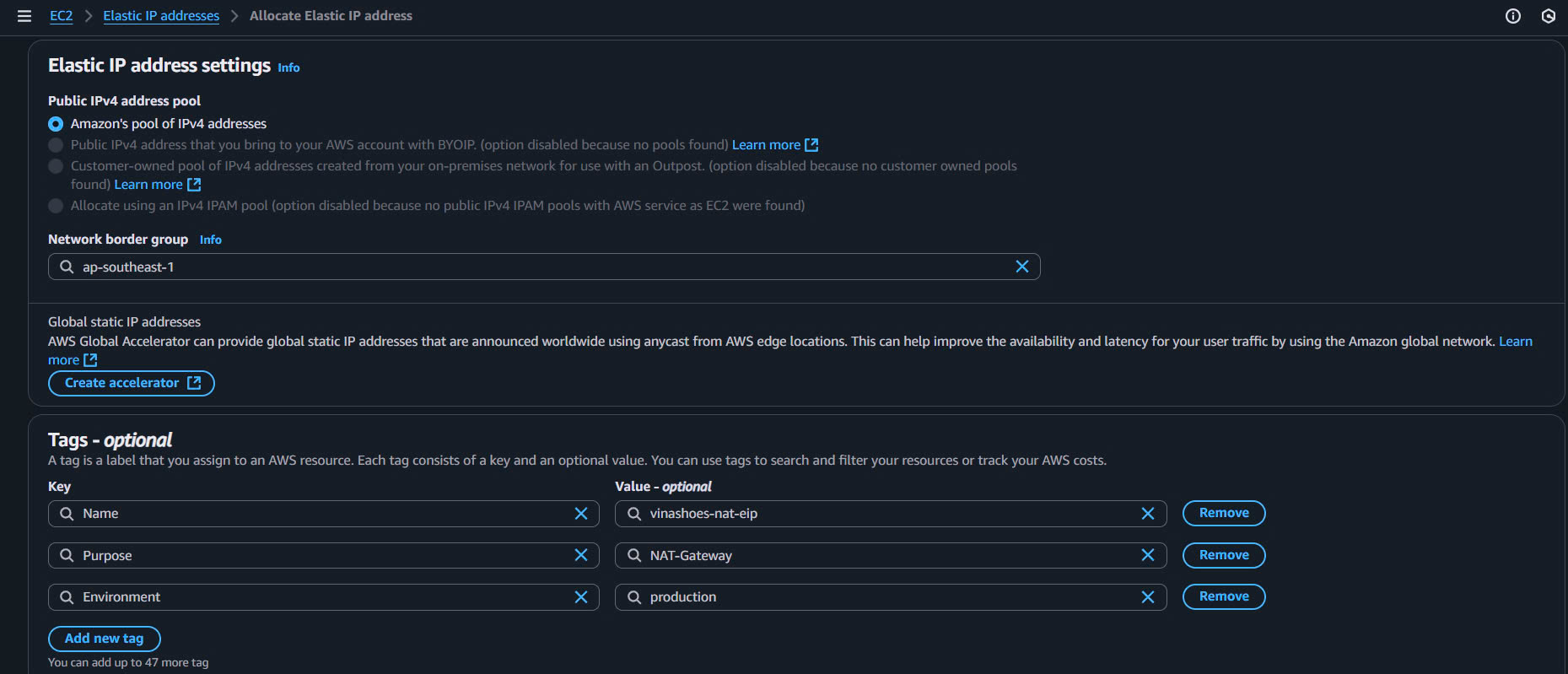
Cấp phát Elastic IP mới:
- Click “Allocate Elastic IP address”
- Network Border Group: Để mặc định (us-east-1)
- Public IPv4 address pool: Amazon’s pool of IPv4 addresses
-
Thêm Tags:
- Click “Add tag”
- Key: Name, Value: vinashoes-nat-eip
- Key: Purpose, Value: NAT-Gateway
- Key: Environment, Value: production
-
Hoàn thành cấp phát:
- Click “Allocate”
- Sao chép Allocation ID (eipalloc-xxxxxxxxx) và Public IP address
CLI (nếu cần):
# Allocate Elastic IP trong VPC domain
aws ec2 allocate-address --domain vpc \
  --tag-specifications 'ResourceType=elastic-ip,Tags=[{Key=Name,Value=vinashoes-nat-eip},{Key=Purpose,Value=NAT-Gateway}]'

# Save Allocation ID
export EIP_ALLOC_ID=eipalloc-0abc123def456789a
💡 Các phương pháp tốt nhất cho Elastic IP:
- VPC Domain: Required cho NAT Gateway (không phải EC2-Classic)
- Fixed IP: EIP đảm bảo NAT Gateway IP không thay đổi khi restart
- Billing: EIP free khi attached, charge $0.005/hour khi idle
- Limits: Default limit 5 EIPs per region (có thể request tăng)
5.1.3. Xác minh Elastic IP
Console Verification:
- Trong EC2 Console, check Elastic IPs page
- Verify Domain = vpc, Status = Available
CLI Verification:
# Verify EIP details
aws ec2 describe-addresses --allocation-ids $EIP_ALLOC_ID --output table
5.2. Tạo NAT Gateway
🎯 Mục tiêu: Triển khai NAT Gateway trong public subnet AZ-1a để cung cấp internet access cho private subnets
5.2.1. Tạo NAT Gateway
AWS Console:
-
Truy cập VPC Dashboard:
- AWS Console → VPC → NAT Gateways (trong sidebar trái)
-
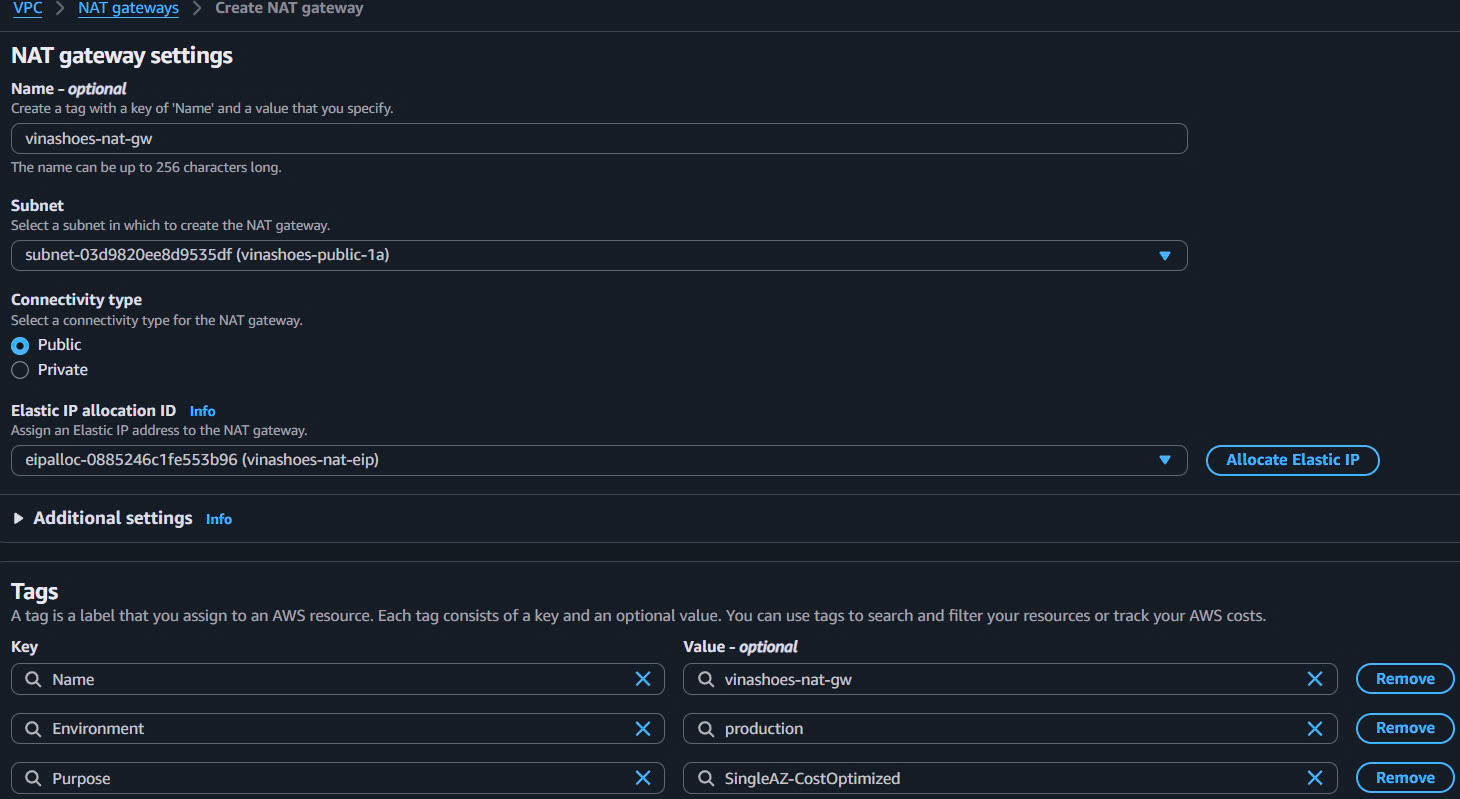
Tạo NAT Gateway:
- Click “Create NAT Gateway”
- Name: vinashoes-nat-gw
-
Cấu hình NAT Gateway:
- Subnet: Chọn public subnet AZ-1a (vinashoes-public-subnet-1a)
- Connectivity type: Public
- Elastic IP allocation ID: Select EIP vừa tạo (eipalloc-xxxxxxxxx)
-
Thêm Tags:
- Key: Name, Value: vinashoes-nat-gw
- Key: Environment, Value: production
- Key: Purpose, Value: SingleAZ-CostOptimized
-
Xem lại và Tạo:
- Xem lại tất cả cài đặt
- Click “Create NAT Gateway”
- Ghi chú NAT Gateway ID (nat-xxxxxxxxx)
5.2.2. Giám sát việc tạo NAT Gateway
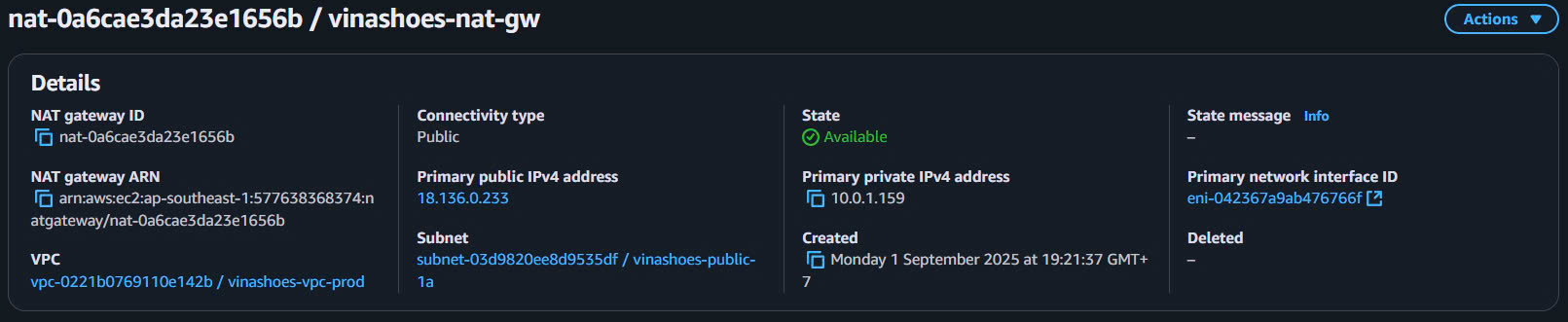
Chờ trạng thái Available:
- Creation takes 2-5 minutes
- State changes từ
pending→available - Status shows
Availablekhi ready
CLI (nếu cần):
# Create NAT Gateway
aws ec2 create-nat-gateway --subnet-id $PUBLIC_SUBNET_1A --allocation-id $EIP_ALLOC_ID \
  --tag-specifications 'ResourceType=nat-gateway,Tags=[{Key=Name,Value=vinashoes-nat-gw}]'

# Save NAT Gateway ID
export NAT_GW_ID=nat-0def456ghi789012b

# Wait for available state
aws ec2 wait nat-gateway-available --nat-gateway-ids $NAT_GW_ID
5.2.3. Verify NAT Gateway Configuration
Console Verification:
- Check State = Available
- Verify VPC ID matches your VPC
- Confirm Subnet ID is public subnet
- Check Elastic IP is properly assigned
CLI Verification:
# Get detailed NAT Gateway info
aws ec2 describe-nat-gateways --nat-gateway-ids $NAT_GW_ID --output table
⚠️ Important Notes:
- NAT Gateway phải tạo trong public subnet, không phải private subnet
- Elastic IP cần thiết để có fixed public IP
- Creation time: 2-5 minutes để become available
- Không thể change subnet sau khi tạo
💰 Cost Optimization:
- Single-AZ: ~$32.40/month (730 hours × $0.044/hour) + data processing
- Multi-AZ Alternative: ~$64.80/month cho 2 NAT Gateways
- Data Processing: $0.044 per GB processed
- Cross-AZ Transfer: ~$0.01 per GB cho traffic từ AZ-1b
5.3. Cấu hình Route Tables
🎯 Mục tiêu: Route traffic từ cả 2 private subnets qua NAT Gateway để enable internet access
5.3.1. Cập nhật Private Route Table AZ-1a
AWS Console:
-
Truy cập VPC Route Tables:
- AWS Console → VPC → Route Tables
-
Chỉnh sửa Private Route Table AZ-1a:
- Tìm và click route table
vinashoes-private-rt-1a - Tab Routes → Click “Edit routes”
- Tìm và click route table
-
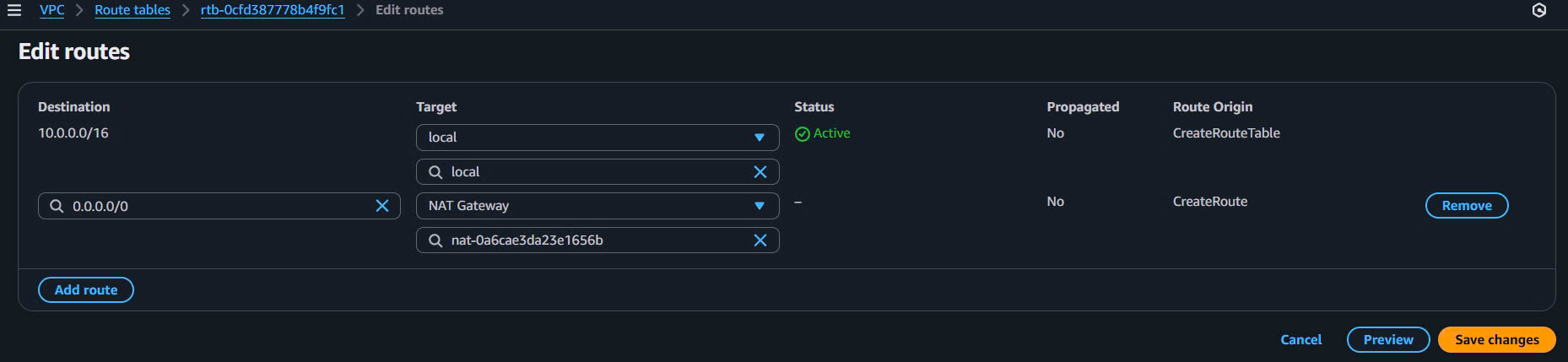
Thêm Route NAT Gateway:
- Click “Add route”
- Destination: 0.0.0.0/0
- Target: NAT Gateway → Select vinashoes-nat-gw
- Click “Save changes”
5.3.2. Cập nhật Private Route Table AZ-1b
AWS Console:
-
Chỉnh sửa Private Route Table AZ-1b:
- Tìm và click route table
vinashoes-private-rt-1b - Tab Routes → Click “Edit routes”
- Tìm và click route table
-
Thêm Route NAT Gateway:
- Click “Add route”
- Destination: 0.0.0.0/0
- Target: NAT Gateway → Select vinashoes-nat-gw (same NAT Gateway)
- Click “Save changes”
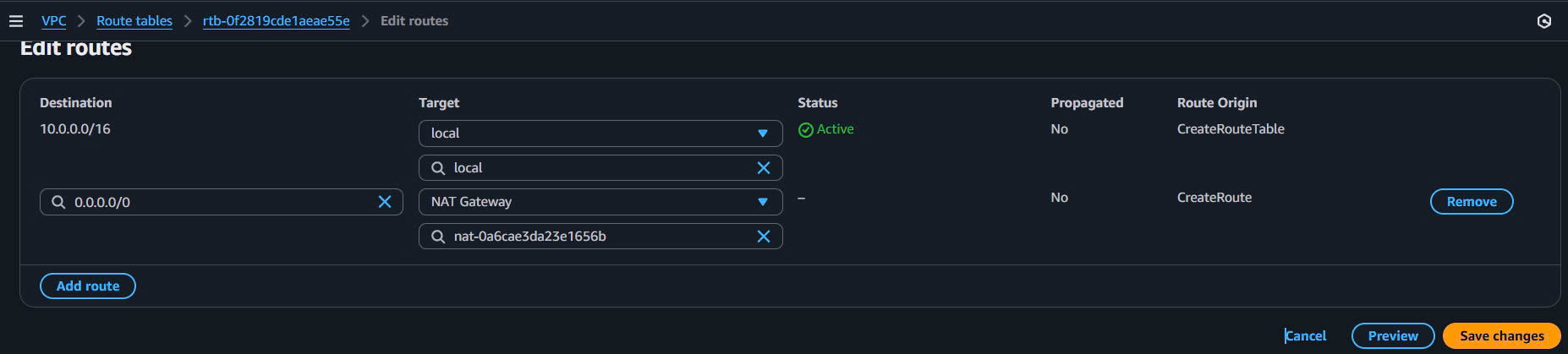
5.3.3. Xác minh cấu hình Route
Expected Route Tables:
Private RT AZ-1a:
Destination      Target                    State
10.0.0.0/16      local                     active
0.0.0.0/0        nat-0def456ghi789012b     active
Private RT AZ-1b:
Destination      Target                    State
10.0.0.0/16      local                     active
0.0.0.0/0        nat-0def456ghi789012b     active
CLI (nếu cần):
# Add routes cho both private route tables
aws ec2 create-route --route-table-id $PRIVATE_RT_1A --destination-cidr-block 0.0.0.0/0 --nat-gateway-id $NAT_GW_ID
aws ec2 create-route --route-table-id $PRIVATE_RT_1B --destination-cidr-block 0.0.0.0/0 --nat-gateway-id $NAT_GW_ID

# Verify routes
aws ec2 describe-route-tables --route-table-ids $PRIVATE_RT_1A $PRIVATE_RT_1B --output table
Cross-AZ Routing Explanation:
- AZ-1b traffic đi qua NAT Gateway trong AZ-1a
- Small data transfer cost (~$0.01/GB) nhưng vẫn cost-effective hơn 2nd NAT Gateway
- Latency tăng ~1-2ms cho cross-AZ traffic, acceptable cho majority use cases
- Monitor CloudWatch metrics cho data transfer costs
✅ Route Tables Configuration Checklist:
- Private RT AZ-1a có route 0.0.0.0/0 → NAT Gateway
- Private RT AZ-1b có route 0.0.0.0/0 → NAT Gateway
- Both route tables có local route cho VPC CIDR (automatic)
- Subnet associations đúng với respective AZs
- All routes trong state “active”
5.4. Testing & Verification
🎯 Mục tiêu: Xác minh private subnets có thể access internet thông qua NAT Gateway
5.4.1. Kiểm tra điều kiện tiên quyết
Xác minh cơ sở hạ tầng:
- Elastic IP đã associate với NAT Gateway
- NAT Gateway State = “Available”
- Route Tables configured correctly
- Test instance có security group allow outbound HTTP/HTTPS
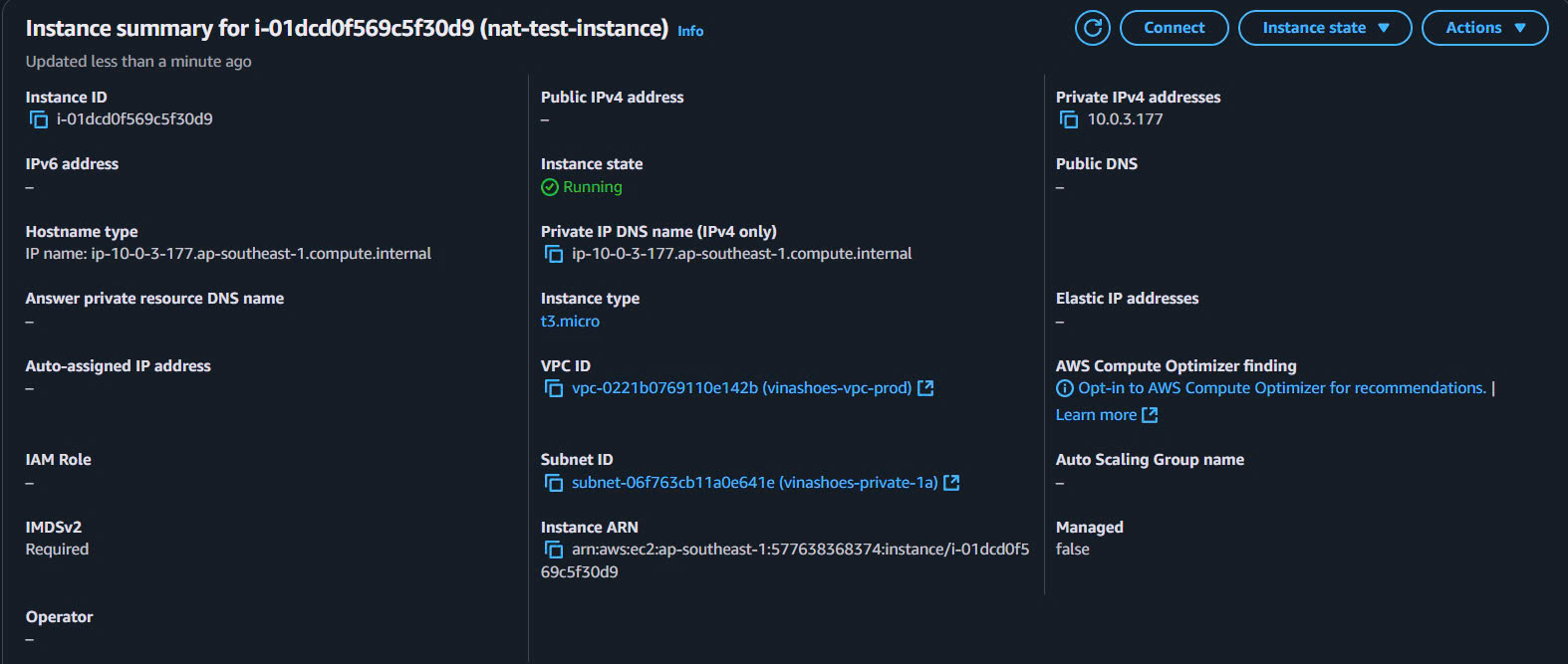
5.4.2. Tạo Test Instance trong Private Subnet
AWS Console:
-
Khởi chạy EC2 Instance:
- AWS Console → EC2 → Launch Instance
- Name: nat-test-instance
- AMI: Amazon Linux 2023
- Instance Type: t3.micro
- Subnet: vinashoes-private-subnet-1a
- Auto-assign Public IP: Disable
- Security Group: vinashoes-private-sg
-
Cấu hình Security Group (nếu cần):
- Outbound Rules:
- HTTP (80): 0.0.0.0/0
- HTTPS (443): 0.0.0.0/0
- DNS (53): 0.0.0.0/0
- Outbound Rules:
5.4.3. Test kết nối Internet
Phương pháp 1: Systems Manager Session Manager
AWS Console:
-
Truy cập Systems Manager:
- AWS Console → Systems Manager → Session Manager
-
Bắt đầu Session:
- Click “Start session”
- Chọn test instance → Click “Start session”
-
Test Commands:
# Test DNS resolution
nslookup google.com

# Test HTTP connectivity
curl -I https://httpbin.org/ip

# Check external IP (should be Elastic IP)
curl https://checkip.amazonaws.com

# Test package updates
sudo yum update -y
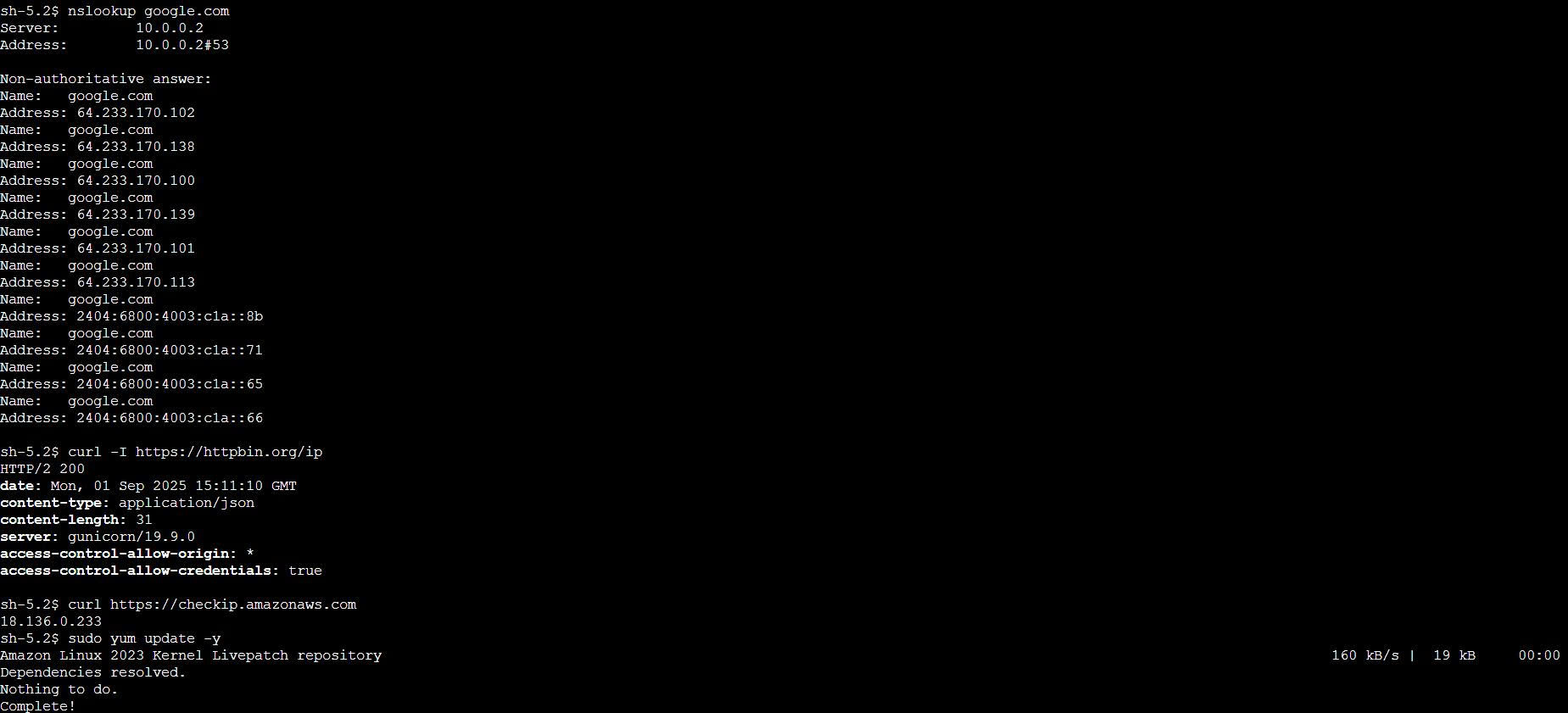
Kết quả mong đợi:
- DNS resolution: Successful
- HTTP/HTTPS requests: Response code 200
- External IP: Matches Elastic IP address
- No timeouts or connection refused errors
5.4.4. Xác minh cả hai Availability Zones
Test AZ-1b Connectivity:
- Launch instance trong vinashoes-private-subnet-1b
- Repeat connectivity tests
- Verify external IP vẫn là Elastic IP (cross-AZ routing works)
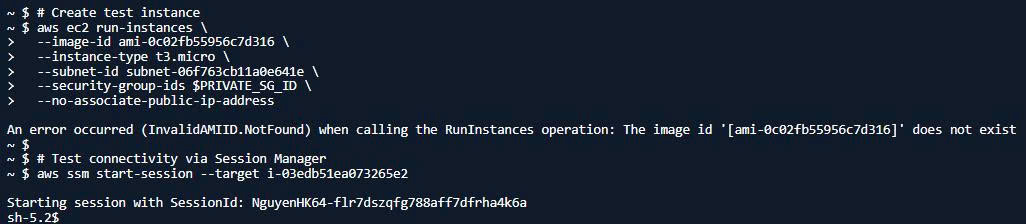
CLI (nếu cần):
# Create test instance
aws ec2 run-instances \
  --image-id ami-0c02fb55956c7d316 \
  --instance-type t3.micro \
  --subnet-id $PRIVATE_SUBNET_1A \
  --security-group-ids $PRIVATE_SG_ID \
  --no-associate-public-ip-address

# Test connectivity via Session Manager
aws ssm start-session --target $INSTANCE_ID
1. Connection Timeout:
- Check route table có route 0.0.0.0/0 → NAT Gateway
- Verify NAT Gateway State = “Available”
- Check security group outbound rules
2. DNS Resolution Fails:
- Route table phải có route 0.0.0.0/0 cho DNS queries
- Security group allow port 53 outbound
3. High Data Transfer Costs:
- Monitor cross-AZ data transfer từ AZ-1b → AZ-1a
- Consider Multi-AZ NAT Gateway nếu data transfer > 50GB/month
✅ Danh sách kiểm tra Testing:
- Private instances có thể resolve DNS
- HTTP/HTTPS requests successful từ both AZs
- External IP matches Elastic IP address
- No packet drops or connection timeouts
- Cross-AZ routing working correctly
5.5. Clean Up Resources
🗒️ Clean Up Prerequisites:
awsCLI configured with appropriate permissions- Environment variables loaded:
source vpc-resources.env - Confirm no resources depend on NAT Gateway before deletion
5.5.1. Remove NAT Gateway Routes from Route Tables
Remove routes from Private Route Tables:
# Load environment variables
source vpc-resources.env

# Remove NAT Gateway route from Private RT AZ-1a
aws ec2 delete-route --route-table-id $PRIVATE_RT_1A --destination-cidr-block 0.0.0.0/0

# Remove NAT Gateway route from Private RT AZ-1b
aws ec2 delete-route --route-table-id $PRIVATE_RT_1B --destination-cidr-block 0.0.0.0/0

echo "✅ NAT Gateway routes removed from private route tables"
5.5.2. Delete NAT Gateway
Delete the NAT Gateway:
# Delete NAT Gateway
aws ec2 delete-nat-gateway --nat-gateway-id $NAT_GW_ID

# Wait for deletion to complete (takes 1-2 minutes)
echo "Waiting for NAT Gateway deletion..."
aws ec2 wait nat-gateway-deleted --nat-gateway-ids $NAT_GW_ID

echo "✅ NAT Gateway deleted successfully"
5.5.3. Release Elastic IP
Release the allocated Elastic IP:
# Release Elastic IP
aws ec2 release-address --allocation-id $EIP_ALLOC_ID

echo "✅ Elastic IP released successfully"
5.5.4. Verify Clean Up
Verify all resources are deleted:
# Check NAT Gateway status (should not exist)
aws ec2 describe-nat-gateways --nat-gateway-ids $NAT_GW_ID 2>/dev/null || echo "NAT Gateway deleted"

# Check Elastic IP status (should not exist)
aws ec2 describe-addresses --allocation-ids $EIP_ALLOC_ID 2>/dev/null || echo "Elastic IP released"

# Verify route tables no longer have NAT Gateway routes
aws ec2 describe-route-tables --route-table-ids $PRIVATE_RT_1A $PRIVATE_RT_1B \
  --query 'RouteTables[].Routes[?GatewayId==`nat-*`]'

echo "✅ Clean up verification complete"
⚠️ Important Notes:
- Dependency Check: Ensure no EC2 instances or ECS tasks are running in private subnets before removing routes
- Wait Times: NAT Gateway deletion takes 1-2 minutes
- Cost Impact: Resources continue to accrue charges until fully deleted
- Route Tables: Private subnets will lose internet access after route removal
Cost Analysis & Monitoring
💰 Cost Breakdown: Understanding NAT Gateway costs cho informed decision making
5.6. Thành phần chi phí
Monthly Cost Calculation:
| Component | Formula | Cost (USD) | Notes |
|---|---|---|---|
| NAT Gateway Hourly | 730 hours × $0.045/hour | $32.85 | Fixed cost regardless of usage |
| Data Processing | 1TB × $0.045/GB | $45.00 | Per GB processed by NAT Gateway |
| Cross-AZ Transfer | 500GB × $0.01/GB | $5.00 | AZ-1b → AZ-1a traffic |
| Total (1TB scenario) | $82.85 | For moderate usage |
So sánh chi phí:
| Architecture | Monthly Cost | Pros | Cons |
|---|---|---|---|
| Single NAT Gateway | ~$83 (1TB) | Cost effective, simple | Single point failure |
| Multi-AZ NAT Gateway | ~$166 (1TB) | High availability | 2x NAT Gateway costs |
| NAT Instance (t3.micro) | ~$9 + data | Very cheap | Manual maintenance, limited bandwidth |
Phân tích hòa vốn (Break-even Analysis):
| Khối lượng Data Transfer | Single NAT Gateway | Multi-AZ NAT Gateway | NAT Instance | Khuyến nghị |
|---|---|---|---|---|
| 100GB/tháng | $41.85 | $83.70 | $14.50 | NAT Instance (tiết kiệm nhất) |
| 500GB/tháng | $55.35 | $110.70 | $29.50 | NAT Instance |
| 1TB/tháng | $82.85 | $165.70 | $54.50 | Single NAT Gateway |
| 2TB/tháng | $137.85 | $275.70 | $104.50 | Single NAT Gateway |
| 5TB/tháng | $270.35 | $540.70 | $249.50 | Single NAT Gateway |
💡 Mẹo tối ưu hóa chi phí:
- Task 6 VPC Endpoints sẽ reduce 30-50% NAT traffic
- Monitor cross-AZ transfer để decide Multi-AZ break-even
- Use VPC Flow Logs để identify traffic patterns
CLI (nếu cần):
# Monitor NAT Gateway costs
aws cloudwatch get-metric-statistics \
  --namespace AWS/NatGateway \
  --metric-name BytesOutToDestination \
  --dimensions Name=NatGatewayId,Value=$NAT_GW_ID \
  --start-time $(date -u -d '24 hours ago' +%Y-%m-%dT%H:%M:%S) \
  --end-time $(date -u +%Y-%m-%dT%H:%M:%S) \
  --period 3600 \
  --statistics Sum
5.7. Các vấn đề phổ biến & Giải pháp
1. No Internet Access:
- ✅ NAT Gateway State = “Available”
- ✅ Route 0.0.0.0/0 → NAT Gateway exists trong private route tables
- ✅ Security group allow outbound 80/443/53
- ✅ NACL allow outbound traffic
2. High Data Transfer Costs:
- Monitor cross-AZ transfer từ AZ-1b → AZ-1a
- Consider Multi-AZ nếu cross-AZ transfer > 3.3TB/month
- Implement VPC Endpoints trong Task 6
3. Performance Issues:
- Check CloudWatch metrics cho packet drops
- Monitor connection count (limit: 55,000)
- Consider bandwidth limitations (5 Gbps base, up to 45 Gbps)
4. DNS Resolution Fails:
- Verify route 0.0.0.0/0 trong private route tables
- Check security group allow port 53 UDP outbound
- Test with:
nslookup google.com
5.8. Các phương pháp tốt nhất
1. Security:
- Restrict outbound traffic qua security groups, không rely on NAT Gateway
- Use NACLs cho additional layer of security
- Monitor internet traffic với VPC Flow Logs
2. Performance:
- Place NAT Gateway trong same AZ với majority traffic để minimize cross-AZ
- Use multiple NAT Gateways cho high availability if budget allows
- Monitor connection count và bandwidth utilization
3. Cost Management:
- Regular review CloudWatch metrics để identify optimization opportunities
- Implement VPC Endpoints cho AWS services (Task 6)
- Consider NAT Instance cho very low traffic scenarios
4. Monitoring:
- Set up CloudWatch alarms cho unusual traffic patterns
- Track data processing costs monthly
- Monitor cross-AZ transfer costs
Task 5 Deliverables
✅ Cơ sở hạ tầng đã hoàn thành
| Resource | Status | Configuration | Purpose |
|---|---|---|---|
| Elastic IP | ✅ Created | Static public IP | Stable outbound IP address |
| NAT Gateway | ✅ Deployed | AZ-1a public subnet | Internet access cho private subnets |
| Route Tables | ✅ Configured | 0.0.0.0/0 → NAT Gateway | Route private traffic to internet |
| Testing | ✅ Verified | Both AZ connectivity | Cross-AZ routing working |
✅ Kiến trúc đạt được
- Single-AZ NAT Gateway deployed trong us-east-1a
- Cost-optimized architecture (~$83/month for 1TB)
- Cross-AZ routing cho AZ-1b traffic
- Internet access verified cho private subnets
- Monitoring setup for cost tracking
🎉 Task 5 Complete!
Private subnets có secure internet access qua NAT Gateway. ECS Fargate tasks có thể pull container images và communicate with external APIs.
Infrastructure Cost: ~$83/month (1TB traffic scenario)
Next Step: Task 6 - VPC Endpoints để optimize costs (~30-50% reduction)
Xem trước Task 6 - VPC Endpoints
Các tối ưu hóa sắp tới:
- S3 Gateway Endpoint: FREE - reduce image/backup traffic
- ECR Interface Endpoint: ~$14/month - reduce container pull traffic
- CloudWatch Logs Endpoint: ~$14/month - reduce logging traffic
- Expected Total Savings: 30-50% NAT Gateway cost reduction
Task 6 sẽ significantly optimize your infrastructure costs while maintaining performance.