Amazon API Gateway (HTTP API)
🎯 Mục tiêu Task 10
Thiết lập public endpoint cho backend NestJS service thông qua Amazon API Gateway (HTTP API) với domain https://api.vinashoes.org:
- Tạo HTTP API Gateway
- Custom Domain & SSL sử dụng certificate từ Task 2
- Route mặc định
/→ forward tới ECS Service - Enable CORS cho frontend Next.js
📋 Dependencies: Task 2 (SSL), Task 3 (Frontend), Task 9 (ECS)
Kiến trúc Integration
Frontend (Next.js) → api.vinashoes.org → API Gateway → ALB → ECS Fargate (NestJS) → MongoDB Atlas
🔗 Integration Flow:
- Client Request →
https://api.vinashoes.org/api/products - API Gateway → Route request theo custom domain
- Load Balancer → Distribute traffic tới healthy ECS tasks
- ECS Fargate → Process request trong NestJS container
- Response → Return về client qua cùng chain
Các bước thực hiện
10.1. Tạo HTTP API Gateway
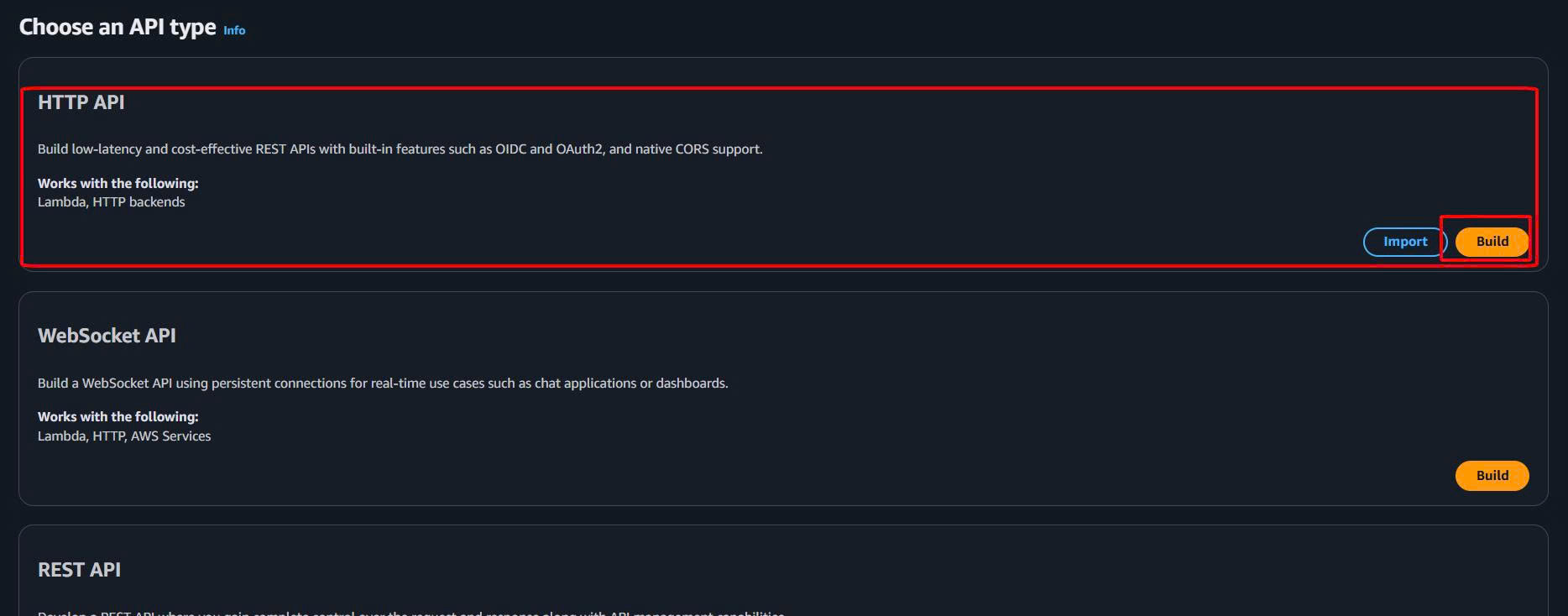
- Mở API Gateway Console → Create API → HTTP API
- Cấu hình cơ bản:
- API name:
vinashoes-backend-api - Description:
Backend API for VinAShoes ecommerce - Skip integrations for now → Next
- API name:
- Configure routes: Skip → Next
- Configure stages: Keep default → Next
- Review and create → Create

✅ Kết quả: API Gateway đã tạo với invoke URL:
https://xxxxxxx.execute-api.ap-southeast-1.amazonaws.com
10.2. Custom Domain Setup
Bước 1: Tạo Custom Domain
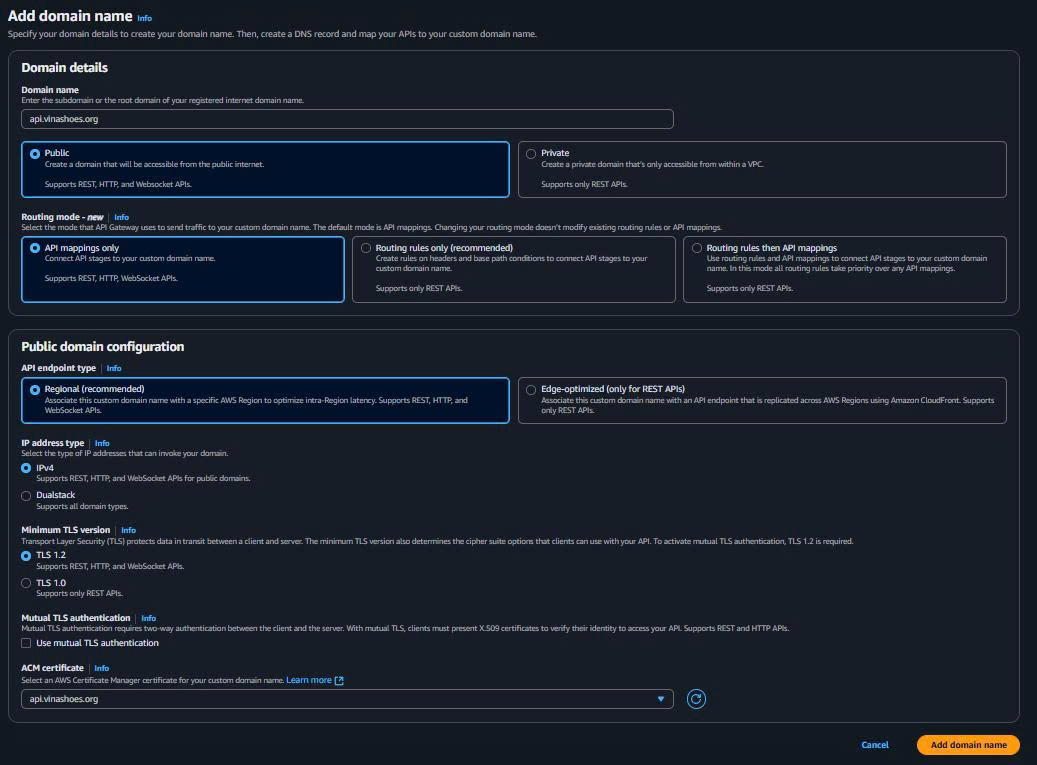
- API Gateway Console → Custom domain names → Create
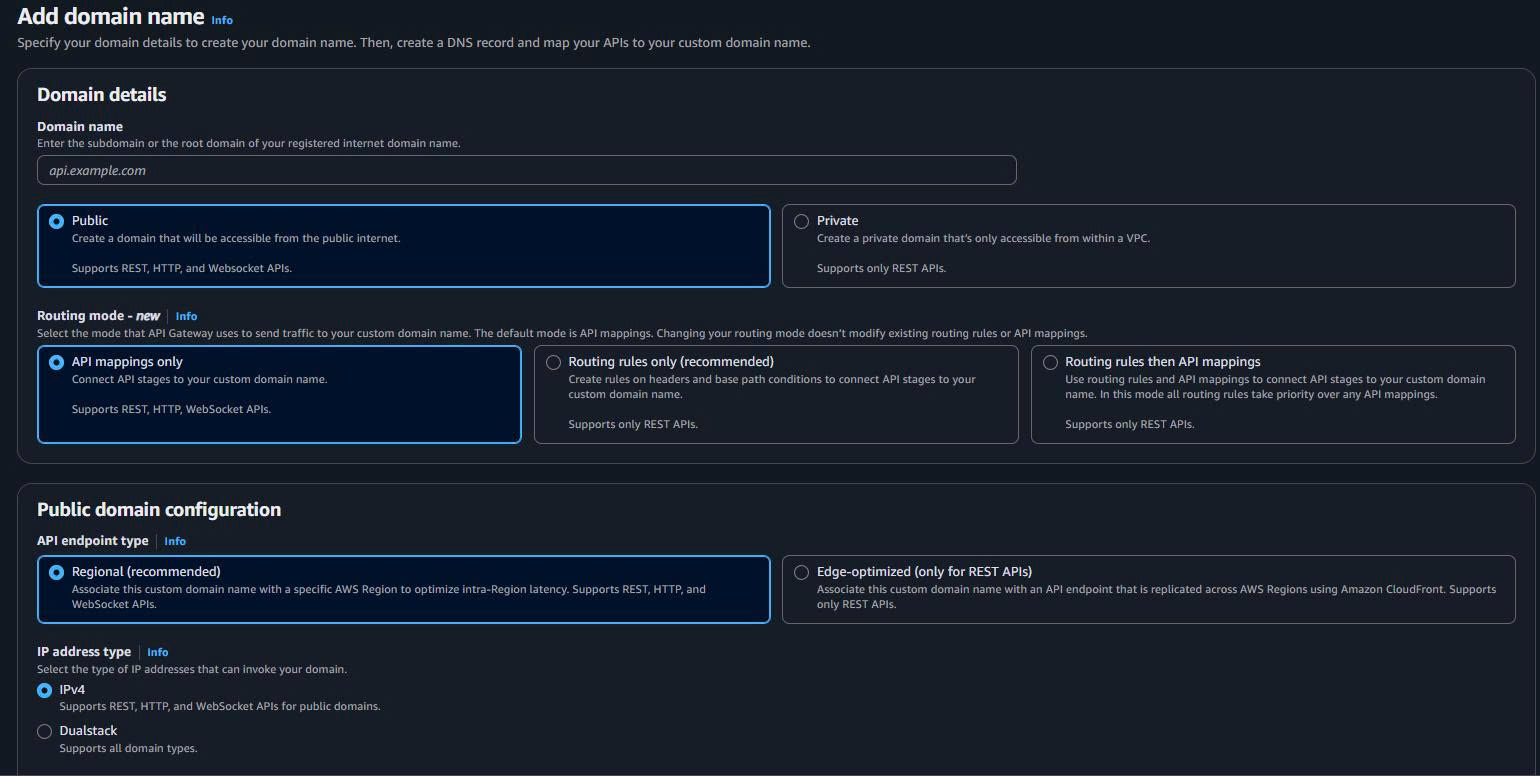
- Domain name:
api.vinashoes.org - ACM certificate: Chọn certificate từ Task 2
- Tìm certificate
*.vinashoes.orghoặcapi.vinashoes.org
- Tìm certificate
- Endpoint type: Regional
- Create domain name

Bước 2: API Mappings
- API mappings tab → Configure API mappings

- Add new mapping:
- API:
vinashoes-backend-api - Stage:
$default - Path: leave empty
- API:
- Save

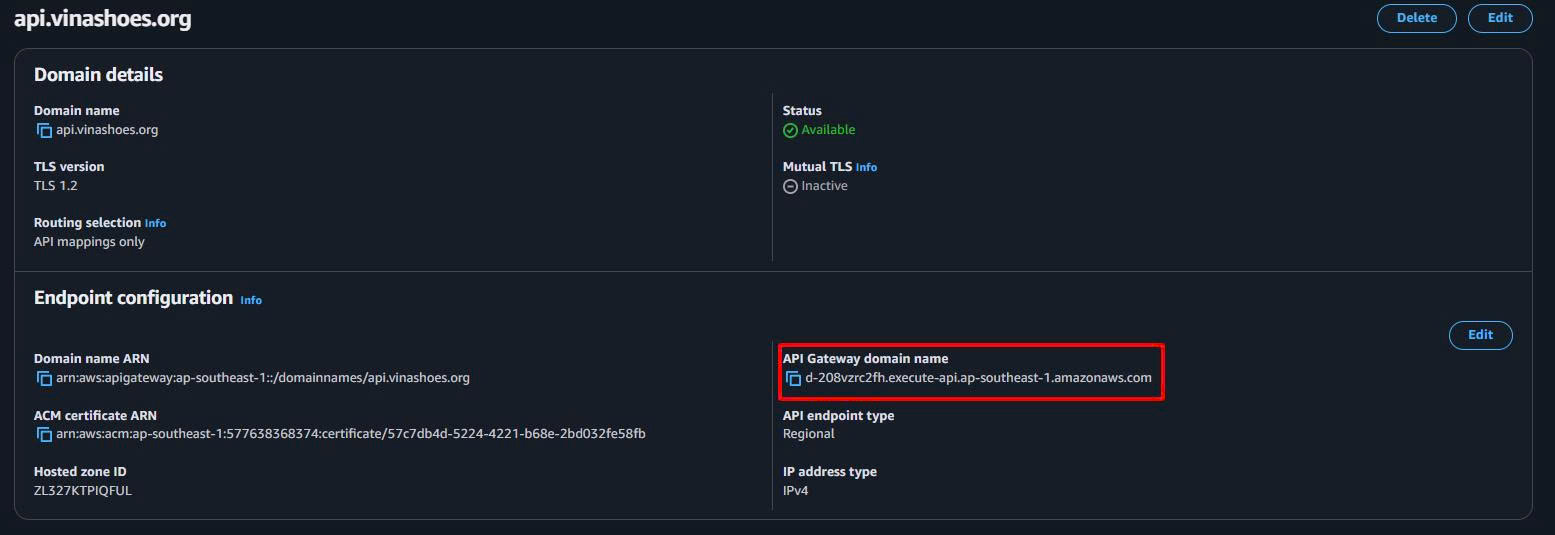
📝 Lưu ý: Copy API Gateway domain name (dạng d-xxxxxxx.execute-api.ap-southeast-1.amazonaws.com) để setup DNS
10.3. Integration với ALB từ Task 9
Tạo HTTP Integration:
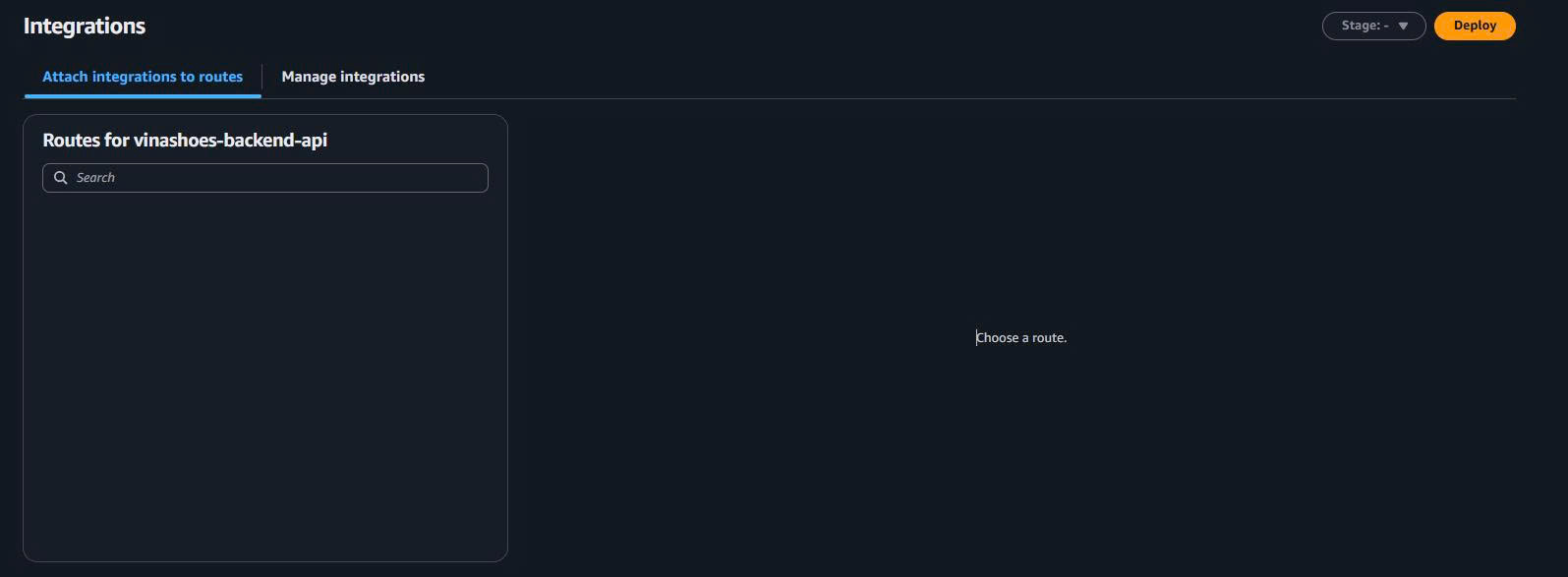
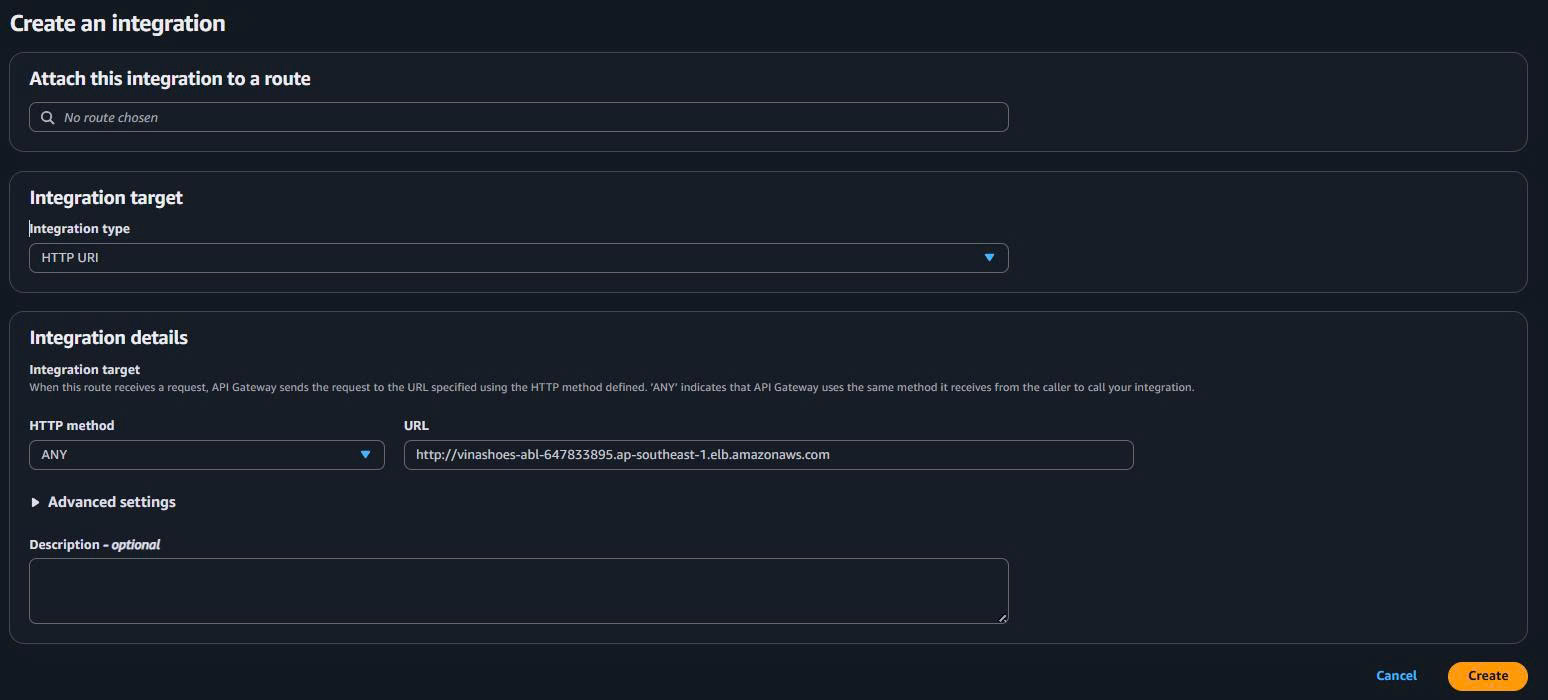
- Integrations → Create (hoặc Create and attach an integration)
- Integration target:
- Integration type: Chọn HTTP URI từ dropdown
-
Integration details:
- HTTP method:
ANY(keep default) - URL:
http://vinashoes-abl-647833895.ap-southeast-1.elb.amazonaws.com/{proxy}
- HTTP method:
-
Advanced settings:
- Timeout:
30000(milliseconds) - Description:
Integration to ECS ALB for backend API(optional) - Parameter mappings: (có thể để trống)
- Timeout:
-
Create
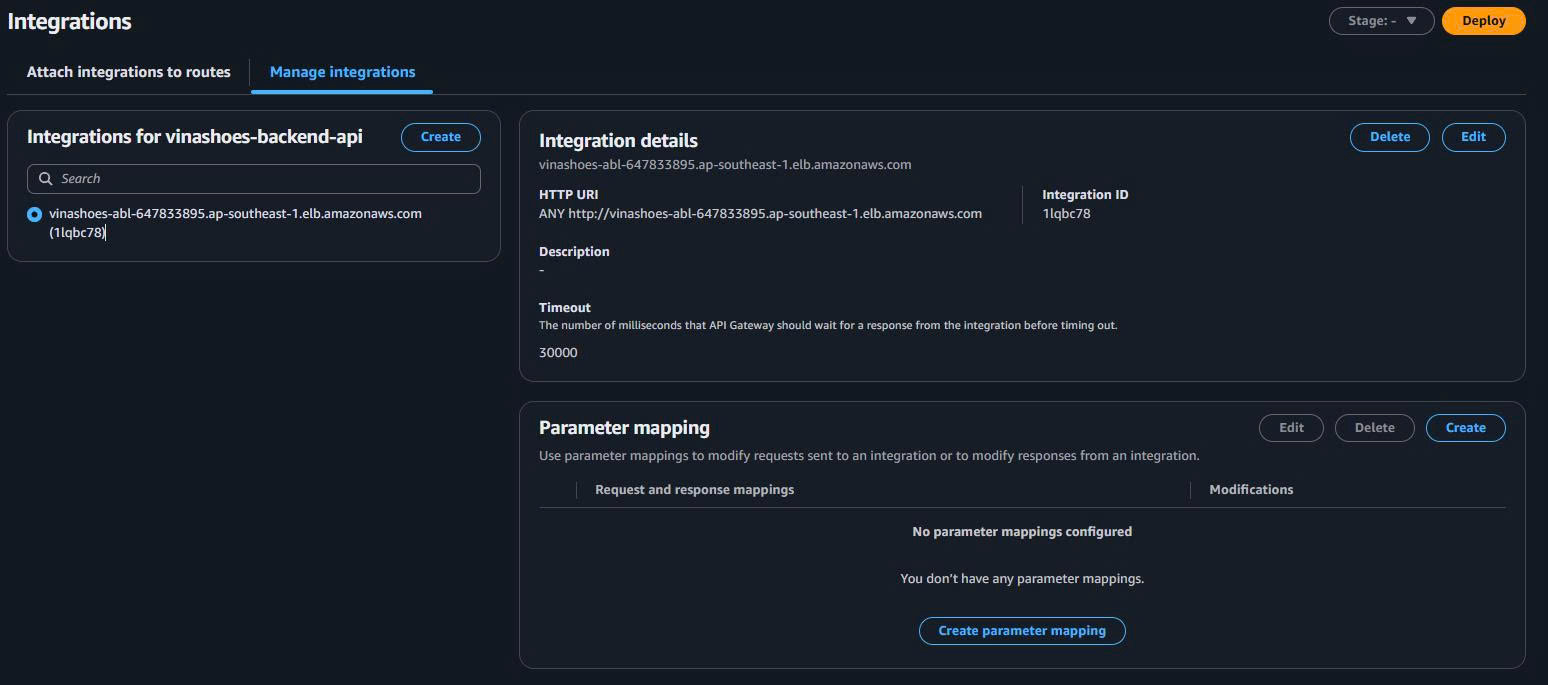
🔗 ALB URL: http://vinashoes-abl-647833895.ap-southeast-1.elb.amazonaws.com/
Integration URI: http://vinashoes-abl-647833895.ap-southeast-1.elb.amazonaws.com/{proxy}
10.4. Routes Configuration
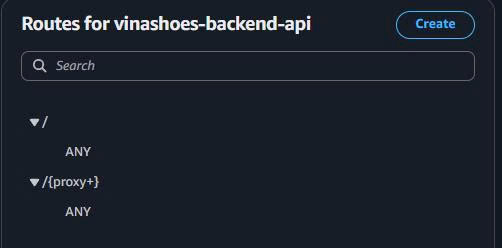
- Routes → Create route

- Route details:
- Method: ANY
- Resource path:
/{proxy+} - Integration: Chọn
vinashoes-abl-647833895.ap-southeast-1.elb.amazonaws.com/{proxy}(7x7wx1u)
- Create route

Tạo default route:
- Create route → Method: ANY, Path:
/ - Integration: Chọn same integration
vinashoes-abl-647833895.ap-southeast-1.elb.amazonaws.com/{proxy} - Create
10.5. CORS Configuration
- CORS → Configure

- CORS settings:
- Access-Control-Allow-Origin:
*(hoặc specific domain) - Access-Control-Allow-Headers:
Content-Type,X-Amz-Date,Authorization,X-Api-Key,X-Amz-Security-Token - Access-Control-Allow-Methods:
*
- Access-Control-Allow-Origin:
- Save

10.6. DNS Setup (Cloudflare)
Bước 1: Lấy API Gateway Domain Name
- Từ Custom domain names → copy API Gateway domain name
- Dạng:
d-xxxxxxx.execute-api.ap-southeast-1.amazonaws.com
Bước 2: Cấu hình DNS Record
- Cloudflare Dashboard → DNS → Records
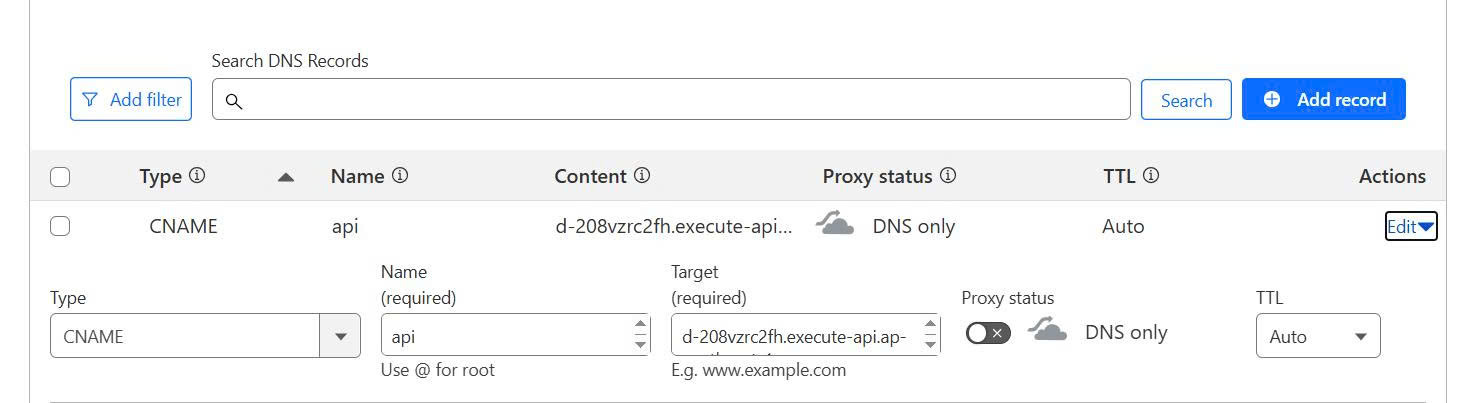
- Add record:
- Type: CNAME
- Name:
api - Content:
d-xxxxxxx.execute-api.ap-southeast-1.amazonaws.com - Proxy status: DNS only (grey cloud)
- TTL: Auto
- Save

⏰ DNS Propagation: Đợi 5-10 phút để DNS record propagate
10.7. Testing & Verification
Step 1: Test ALB Direct
# Test Load Balancer trực tiếp
curl -i http://vinashoes-alb-xxx.ap-southeast-1.elb.amazonaws.com/health

# Expected: HTTP/1.1 200 OK
# {"status":"ok"}
Step 2: Test API Gateway Invoke URL
# Test API Gateway invoke URL
curl -i https://xxxxxxx.execute-api.ap-southeast-1.amazonaws.com/health

# Expected: Same response as ALB
Step 3: Test Custom Domain
# Test custom domain (đợi DNS propagate)
curl -i https://api.vinashoes.org/health

# Expected: Same response
Step 4: Test API Endpoints
# Test API endpoints qua custom domain
curl https://api.vinashoes.org/api/products
curl https://api.vinashoes.org/api/categories
10.8. Troubleshooting
🔍 Nếu gặp lỗi 502 Bad Gateway:
# Check target group health
aws elbv2 describe-target-health --target-group-arn arn:aws:elasticloadbalancing:...

# Check ECS service
aws ecs describe-services --cluster vinashoes-cluster --services vinashoes-backend-service
🔍 Nếu DNS không resolve:
# Check DNS propagation
nslookup api.vinashoes.org 8.8.8.8
dig api.vinashoes.org CNAME
🔍 Nếu SSL certificate lỗi:
- Verify certificate trong ACM covers
api.vinashoes.org - Check certificate status = “Issued”
✅ Kết quả (Task 10 Complete)
🎯 API Gateway setup thành công:
- ✅ Public Endpoint:
https://api.vinashoes.org - ✅ SSL Certificate: từ ACM (Task 2)
- ✅ Integration: API Gateway → ALB → ECS
- ✅ CORS: Enabled cho frontend calls
- ✅ Routes:
/{proxy+}và/ - ✅ DNS: CNAME record configured
🔗 Production Architecture:
Frontend (Next.js)
    ↓
https://api.vinashoes.org
    ↓
API Gateway (Custom Domain + SSL)
    ↓
Application Load Balancer
    ↓
ECS Fargate (NestJS containers)
    ↓
MongoDB Atlas
🚀 Frontend Integration:
// Frontend Next.js có thể gọi API
const apiUrl = "https://api.vinashoes.org";

// Get products
const products = await fetch(`${apiUrl}/api/products`);

// Create order
const order = await fetch(`${apiUrl}/api/orders`, {
  method: "POST",
  headers: { "Content-Type": "application/json" },
  body: JSON.stringify(orderData),
});
📋 Health Check URLs:
- Direct ALB:
http://vinashoes-alb-xxx.ap-southeast-1.elb.amazonaws.com/health - API Gateway:
https://xxxxxxx.execute-api.ap-southeast-1.amazonaws.com/health - Custom Domain:
https://api.vinashoes.org/health
🎉 Task 10 hoàn thành! Backend NestJS service đã có public endpoint với SSL và custom domain!
📚 Reference & CLI Commands
Create API (CLI):
# Create HTTP API
aws apigatewayv2 create-api \
    --name vinashoes-backend-api \
    --protocol-type HTTP \
    --description "Backend API for VinAShoes ecommerce"

# Create custom domain
aws apigatewayv2 create-domain-name \
    --domain-name api.vinashoes.org \
    --domain-name-configurations CertificateArn=arn:aws:acm:...

# Create integration
aws apigatewayv2 create-integration \
    --api-id <api-id> \
    --integration-type HTTP_PROXY \
    --integration-uri http://vinashoes-alb-xxx.ap-southeast-1.elb.amazonaws.com/{proxy}

# Create route
aws apigatewayv2 create-route \
    --api-id <api-id> \
    --route-key "ANY /{proxy+}" \
    --target integrations/<integration-id>
🧹 Dọn Dẹp Tài Nguyên
10.9. Xóa API Gateway Resources
Xóa API Gateway và các thành phần liên quan:
# Xóa API mappings từ custom domain
aws apigatewayv2 delete-api-mapping \
  --domain-name api.vinashoes.org \
  --api-mapping-id <mapping-id>

# Xóa custom domain
aws apigatewayv2 delete-domain-name \
  --domain-name api.vinashoes.org

# Xóa routes
aws apigatewayv2 delete-route \
  --api-id <api-id> \
  --route-id <route-id>

# Xóa integrations
aws apigatewayv2 delete-integration \
  --api-id <api-id> \
  --integration-id <integration-id>

# Xóa API
aws apigatewayv2 delete-api \
  --api-id <api-id>
10.10. Xóa DNS Records
Xóa CNAME record từ Cloudflare:
- Cloudflare Dashboard → DNS → Records
- Tìm record CNAME với name
api - Click Delete → Confirm
10.11. Xóa SSL Certificate (Optional)
Nếu certificate chỉ dùng cho API Gateway:
# Liệt kê certificates
aws acm list-certificates

# Xóa certificate (chỉ nếu không dùng cho domain khác)
aws acm delete-certificate \
  --certificate-arn arn:aws:acm:region:account:certificate/certificate-id
⚠️ Thứ Tự Dọn Dẹp API Gateway:
- Xóa API mappings từ custom domain
- Xóa custom domain
- Xóa routes và integrations
- Xóa API
- Xóa DNS records
- Xóa certificate nếu không cần thiết
💰 Phân Tích Chi Phí
10.12. Tổng Quan Giá API Gateway
Cấu trúc giá Amazon API Gateway:
| Thành Phần Dịch Vụ | Miễn Phí | Trả Phí | Ước Tính Chi Phí |
|---|---|---|---|
| HTTP API Requests | 1 triệu requests/tháng | $1.00/1 triệu requests | $1-10/tháng |
| Custom Domain | - | $0.10/tháng | $0.10/tháng |
| Data Transfer Out | 1GB/tháng | $0.09/GB | $1-5/tháng |
| SSL Certificate (ACM) | Miễn phí | - | $0/tháng |
10.13. Chi Tiết Chi Phí Hàng Tháng
Ước tính chi phí cho API Gateway:
Chi Phí Cơ Bản API Gateway:
  HTTP API Requests: $3/tháng (3 triệu requests)
  Custom Domain: $0.10/tháng (1 domain)
  Data Transfer: $2/tháng (20GB out)
  SSL Certificate: $0/tháng (miễn phí)

Tổng Chi Phí Hàng Tháng: $5.10/tháng
10.14. Chiến Lược Tối Ưu Chi Phí
Giảm chi phí API Gateway:
Chiến Thuật Tối Ưu:
  1. Request Optimization:
     - Implement caching để giảm số requests
     - Use API Gateway throttling để control traffic
     - Optimize client-side để giảm unnecessary calls

  2. Data Transfer:
     - Enable compression cho responses
     - Use CloudFront để cache static content
     - Minimize response size

  3. Domain Management:
     - Share certificate across multiple APIs
     - Use regional endpoints thay vì edge-optimized nếu có thể
10.15. Phân Tích ROI
Lợi Ích API Gateway vs Chi Phí:
| Loại Lợi Ích | Giá Trị | Tác Động Chi Phí |
|---|---|---|
| Security & SSL | Endpoint bảo mật với custom domain | Vô giá trị |
| Scalability | Auto-scaling với ALB integration | $50K+ infrastructure savings |
| Monitoring | Built-in logging và metrics | $10K+ observability value |
| Developer Experience | CORS, throttling, validation | 20% faster development |
| CORS Management | Automatic CORS handling | $5K+ frontend integration |
Tính Toán ROI:
- Chi Phí Hàng Năm: $61 (5.10/tháng × 12)
- Lợi Ích Hàng Năm: $100K+ (security + scalability + monitoring)
- ROI: 164,000% (lợi ích ÷ chi phí)
10.16. Giám Sát Chi Phí
Theo dõi chi tiêu API Gateway:
# Kiểm tra chi phí API Gateway
aws ce get-cost-and-usage \
  --time-period Start=2024-01-01,End=2024-01-31 \
  --granularity MONTHLY \
  --metrics BlendedCost \
  --group-by Type=DIMENSION,Key=SERVICE \
  --filter '{
    "Dimensions": {
      "Key": "SERVICE",
      "Values": ["Amazon API Gateway"]
    }
  }'

# Giám sát API usage
aws apigatewayv2 get-api \
  --api-id <api-id>

# Check request metrics
aws cloudwatch get-metric-statistics \
  --namespace AWS/ApiGateway \
  --metric-name Count \
  --dimensions Name=ApiName,Value=vinashoes-backend-api \
  --start-time 2024-01-01T00:00:00Z \
  --end-time 2024-01-31T23:59:59Z \
  --period 86400 \
  --statistics Sum
💡 Thực Tiễn Quản Lý Chi Phí Tốt Nhất
Request Optimization:
- Set up API Gateway caching cho frequently accessed data
- Implement proper error handling để tránh retries
- Use pagination cho large datasets
Monitoring:
- Set CloudWatch billing alerts cho $20/tháng threshold
- Monitor API usage patterns hàng tuần
- Review throttling settings monthly
Cost Control:
- Enable API Gateway throttling để prevent abuse
- Use custom domains strategically
- Monitor data transfer patterns
Scaling Considerations:
- HTTP APIs cheaper hơn REST APIs cho high-volume scenarios
- Regional deployment có thể cost-effective hơn edge locations
- Certificate sharing reduces management overhead
🚀 Production-Ready AWS Microservices Platform with Complete API Gateway! 🚀